NETGEAR is aware of a growing number of phone and online scams. To learn how to stay safe click here.
Forum Discussion

Pipodi
Jul 22, 2022Tutor
Enable Traffic Prioritization on Escape From Tarkov
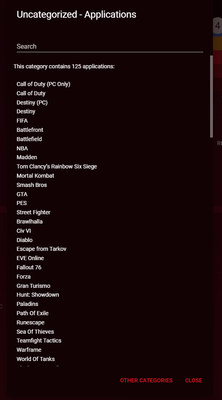
Hi guys, I've just bought an XR1000 and I'm loving it so much. I've set up pretty much of the QoS as I want following the wizards. But I can't find guides/sources on how to prioritize games like ...

Netduma-Fraser
Jul 25, 2022NetDuma Partner
That's the right one. Check the device on the Device Manager and make a note of the IP address, then check the IP on the PC itself in network settings, do they match?
Pipodi
Jul 25, 2022Tutor
Yes, of course!

- Netduma-FraserJul 25, 2022NetDuma PartnerHmm, they can't be the primary ports used then otherwise it would prioritize like the other games are for you. If you add your PC to the Geo-Filter (with PC set to PlayStation on Device Manager) does it show up servers when looking for a game?
- PipodiJul 26, 2022Tutor
Just tried, no server shown in Geo-Filter. But 2 days ago it was showing the server I was connected to.
- Netduma-LiamJul 26, 2022NetDuma Partner
Could you please remove the device from both Geo-filter and Traffic Prio, then go to the three-line menu in Geo-filter and click 'Flush Cloud'. Once that's done, go to the three-line menu in Device Manager and click 'Flush cloud'.
After that, go back to Geo-filter and re-add your PC, make sure you select 'Choose manually' when prompted to pick a service.
Similarly, remove your previous rules from Traffic Prio, then re-add one for your PC and select 'Games Console' as the service.
Test again after that and see if it helps.
- PipodiJul 26, 2022Tutor
Same result, now Geo-filter does not recognize League of Legends servers, but its traffic is being prioritized correctly by DumaOS Classified Games rule.
Recap:
- EFT traffic/server not recognized by Geo-filter and Traffic prio
- League of Legends traffic recognized by Traffic prio but not by Geo-filter
The screen attached is the Geo-filter tab while playing League, but it's the same with EFT.
- Netduma-LiamJul 26, 2022NetDuma Partner
Does the PC have a Wi-Fi adapter or any other interfaces? If so, can you please disable them to ensure that traffic is only going through the R2 and nowhere else.
- PipodiJul 26, 2022Tutor
No, the traffic is going though the ethernet interface because my PC doesn't have any other internet interface. Plus, I don't have an R2, but an XR1000.
- PipodiJul 26, 2022Tutor
Ok, your answer got me thinking. I went into Device Manager and I saw 2 devices with the same IP as my PC. I removed them and reassigned them the IP. Now the original prioritization rule works flawlessly with EFT.
- Netduma-FraserJul 26, 2022NetDuma PartnerGreat to hear that, thanks for the update/solution!
