NETGEAR is aware of a growing number of phone and online scams. To learn how to stay safe click here.
Forum Discussion

David_Antunes
Apr 13, 2019Aspirant
Error Mac address and Ports
Hello i have same manufacture bugs with my xr500.
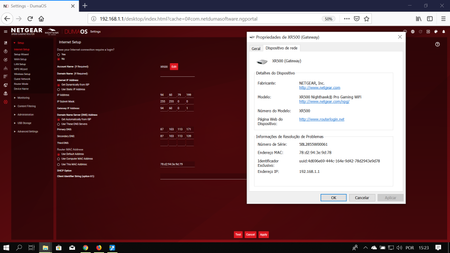
The 1 is my MAC ADDRESS:
On the back of my router the mac end with :78 on my windows is the same
The 2 is my ports i have active port 4...

schumaku
Apr 13, 2019Guru - Experienced User
David_Antunes wrote:
Hello i have same manufacture bugs with my xr500.
Same as ...?
David_Antunes wrote:
The 1 is my MAC ADDRESS:
On the back of my router the mac end with :78 on my windows is the same
Nothing wrong:
- The MAC address printed on the label is the one for the LAN interface, so the same .78 you see on the connected clients.
- The MAC+1 is the Internet/WAN interface MAC address.
David_Antunes wrote:
The 2 is my ports i have active port 4 and the led is on but in the duma os th uses port 1
Current firmware?
- David_AntunesApr 13, 2019Aspirant
It is not "same" but some.
My mac address it is not the same printed on the back of my router and the mac address onduma os software.
- David_AntunesApr 13, 2019Aspirant
XR500 V2.3.2.40
- schumakuApr 14, 2019Guru - Experienced User
David_Antunes wrote:
It is not "same" but some.
My mac address it is not the same printed on the back of my router and the mac address onduma os software.
You said printed and on Windows it shows :78 (this is the LAN interface MAC) while the :79 you see on the Internet screenshot is one higher as expeced - so again, perfectly right.
- Netduma_JackApr 15, 2019NetDuma Partner
Was there anything specific you were trying to achieve here that we can help you with?