NETGEAR is aware of a growing number of phone and online scams. To learn how to stay safe click here.
Forum Discussion

nighthoes
Apr 15, 2022Tutor
Firmware Update Failed (RX1000)
Model: NightHawk XR1000 First of all, I don't understand why such a prominent product is not even available in the product dropdown list provided for New Discussion. It's highly suspect...like en...
nighthoes
Apr 15, 2022Tutor
Thanks Netduma-Fraser for adding to the conversation.
I can confirm that the error cleared after clearing my browser cache, and I can login to the router again.
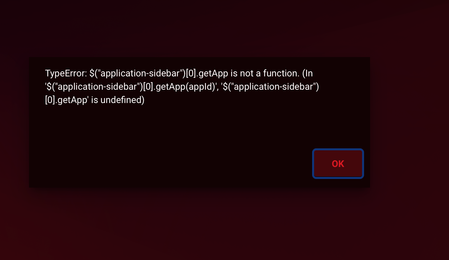
However, I now have this error reappearing on every app and management page:
I will try the suggestion, and I think that means I need to backup the configuration, since your suggestion seems to be to delete everything, which will clear my settings but keep the firmware upgrade?

Netduma-Fraser
Apr 15, 2022NetDuma Partner
I wouldn't suggest doing a backup and then restoring as you could then reintroduce issues. Better to factory reset, confirm no visual issues occurring, make your changes then make a backup so that if you need to reset again on this version you can restore.
It will wipe settings but keep the firmware version.
It will wipe settings but keep the firmware version.
- nighthoesApr 15, 2022Tutor
I was going to say the thought of an old setting makes sense, but that's an unfortunate recommendation, that I have to wipe out everything. Configuring a network is time consuming. There should be more elegant solutions to this. Essentially this means that my configuration is rendered a problematic every time I upgrade firmware.
What do you think about comparing pre upgrade and post upgrade configuration files side by side to find this bad line? Is there any other approach to debugging this?
- Netduma-FraserApr 15, 2022NetDuma PartnerIf you're interested here is a good explanation of why it is recommended and why you shouldn't restore a backup: https://www.snbforums.com/threads/faq-nvram-and-factory-default-reset.22822/
In terms of comparing the backup files I don't think it is a readable format, I don't have an XR at hand currently to double check. Even if it is, it's probably not going to be apparent what would cause the issue. For example, if something is removed/changed between versions and you've saved an old/removed setting then trying to restore that would cause a problem.- nighthoesApr 15, 2022Tutor
plemans Netduma-Fraser Thanks for the insight guys. I will try and reply.