NETGEAR is aware of a growing number of phone and online scams. To learn how to stay safe click here.
Forum Discussion

Tich99
Jan 21, 2023Aspirant
Geo-Filter not working after reset on XR1000
Hi, I had to perform a reset on my XR1000 as it would not assign an ip address to my Xbox console. Since I have reset the router some features are not functioning correctly. I am unable to use t...
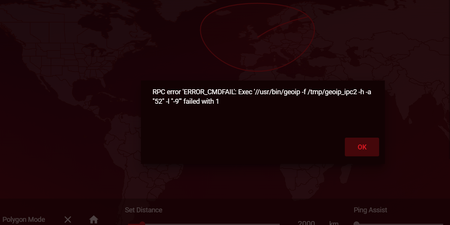
- Jan 21, 2023
Tich99 wrote:
I had to perform a reset on my XR1000 as it would not assign an ip address to my Xbox console.
I would start by trying to work out why that happens. There is a chance that the thing that caused this issue has also resulted in what you see now. Resetting just gets you back to square one.
Start with answers to the usual boilerplate questions.
What firmware version do you have on the device?
A number is more useful than "the latest". (It may not be by the time people read this.) There can also be newer versions, or "hot fixes", that do not show up if you check for new firmware in the browser interface.
It might also help if you told people what the modem is in front of this router, if there is one. The make and model number could be useful. Is it, by any chance, also a router, with a set of LAN ports on the back?
The reason for asking is that a lot of people turn up here trying to put a router behind a modem that is also a router. That can complicate troubleshooting. It can also cause the problem with the Xbox that got you here in the first place.Finally, the XR1000 is not one of the routers covered in this section of the community.
While many questions about routers are generic and could be answered anywhere, some things need specialist knowledge.
You might get more help, and find earlier questions and answers specific to your device, in the appropriate section for your hardware. That's probably here:
Nighthawk Pro Gaming Routers - NETGEAR Communities
Gaming routers have their own DumaOS operating system that is nothing like the one on Netgear's standard routers.
You might like to search there for messages related to your problem.
I will ask the Netgear moderator to move your message.
In the meantime you could visit the support pages:
Support | NETGEAR
Feed in your model number and check the documentation for your hardware. Look at the label on the device for the model number.
Check for various troubleshooting tips.
You may have done this already. I can't tell from your message.
I mention it because Netgear stopped supplying printed manuals and CD versions some years ago and people sometimes miss the downloads.


Netduma-Fraser
Jan 21, 2023NetDuma Partner
How did you do the factory reset exactly? Are you accessing using HTTPS? Are you using Armor?