NETGEAR is aware of a growing number of phone and online scams. To learn how to stay safe click here.
Forum Discussion

zeth07
Mar 03, 2025Aspirant
Geo-Filter showing "random" Players/Peers?
I've been trying to use the Geo-Filter to monitor what is happening in a game in terms of matchmaking and it seems to show some strange behavior that doesn't seem realistic in terms of what is actually happening.
The game is P2P so the Geo-Filter will sometimes show servers or the peers of course. But rather frequently it will show "Peers" in the SAME locations no matter what day or time it is. And these Peer locations don't seem to be ones associated with the servers that I can see on game startup.
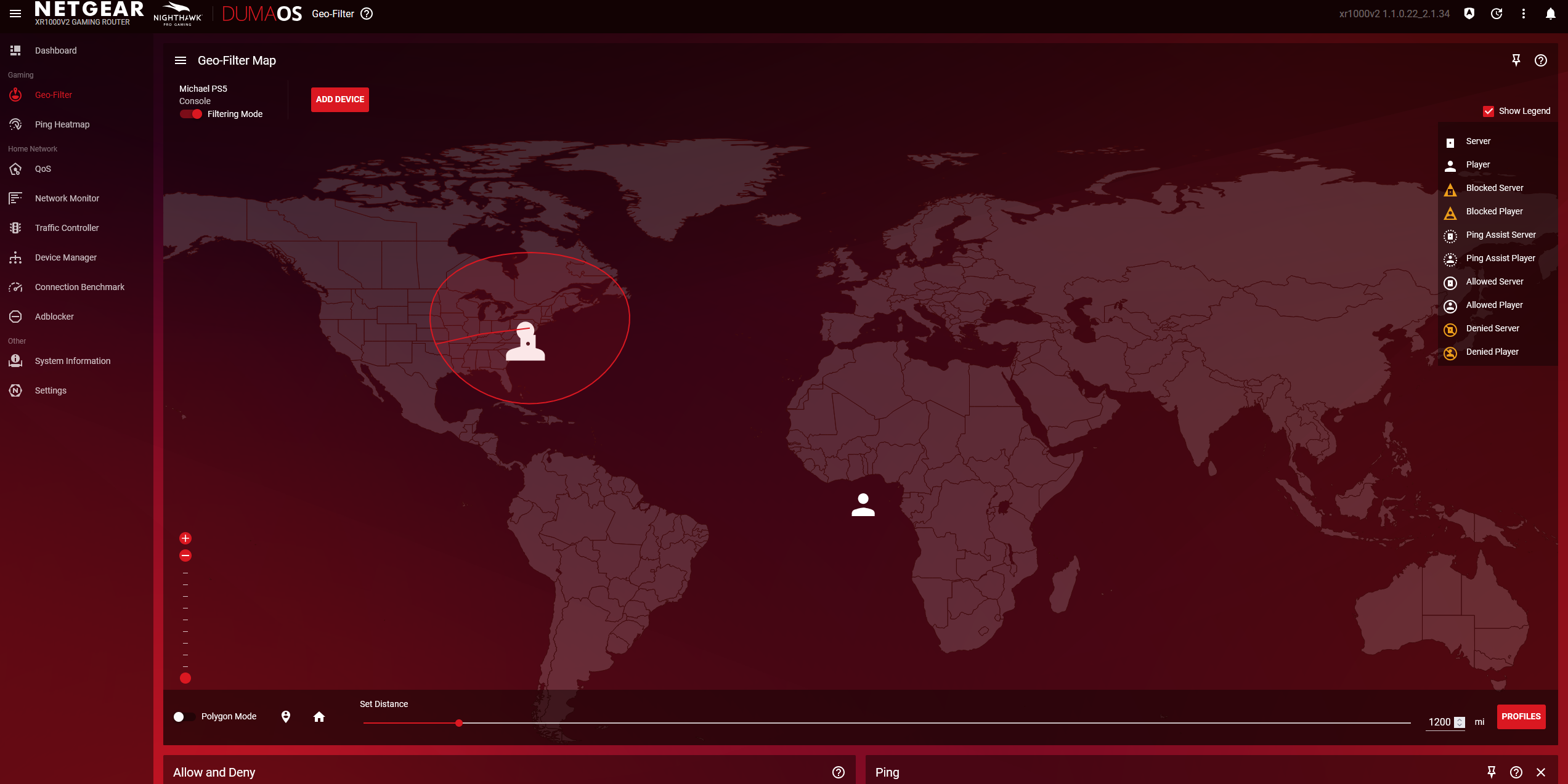
One such Peer example is literally in the middle of the ocean near Africa, and surprisingly it is not one of the islands that would somehow make sense still. The IP does change within a range that seems plausible like 10.0.0.17 or 10.0.0.9 but it's in the most random spot.
I see a similar result from someone in the Netherlands.
These seem to happen almost simultaneously when the Geo-Filter pings a West Coast Playstation server. Denying them seems to serve no functional purpose since they still show up on the Geo-Filter to be checked, presumably because the game is still generating those "Peers" even if I'm denying their existence.
What I would like to know is if these "Peers" are actual people or is there some other way to distinguish what is happening?
3 Replies
- Netduma-FraserNetDuma PartnerThe one by Africa can be totally ignored, that's an anomaly we know about. The others I couldn't say exactly yet but it does look like the Geo-Filter isn't set up correctly as they shouldn't be allowed outside your radius. Could you provide a full screenshot of the Geo-Filter page please?
- zeth07Aspirant
I didn't have the filter on at the time since I was just testing to see what actually showed up but I took another screenshot anyway just to show I do have it setup right I think when I try to use it anyway. I have it set on Strict Mode and Fast Search but I don't know what Fast Search even does since it's not mentioned in the tooltips.
I know you said to ignore the player near Africa but can you explain what it is and why it should be ignored? In the new screenshot I do have my filter on and yet the Peer near Africa isn't even showing up as Blocked Player.
There was another instance where there WAS another peer in the same area where it showed up as blocked but they were overlapped, as if one was allowed and one was blocked. They always seem to have the same IP start like 10.X.X.X. Are these actual local routing servers instead?
I don't know if you'll be able to answer this but does Playstation only have servers on the West Coast?
When I first start the Playstation a server pops up that's:
Dedicated Server
9f34824dd13e2328
ec2-52-40-62-77.us-west-2.compute.amazonaws.com
Is there really no East Coast server I should be connecting to instead?
Then when I'm trying matchmaking in Street Fighter 6 a lot of the time I see this server on the West Coast:
stun.ww.np.cn.s0.playstation.net.
9f34b37ed13e2328
I'm guessing this is just the regular PSN server that has to connect the game to PSN and not any of the "game" servers cause I've seen them on startup.
The other question I have is when I first start the game it shows ALL the servers and they are marked on the Geo-Filter as allowed by default and NOT by me, even the ones outside the range. I'm guessing this is a whitelist thing but then there's one in like Japan that actually has the blocked server label.
The next question I have is the game itself has something called the "Battle Hub" which lists all the game servers available. So Asia, North America, South America, and Europe. Then like 60 servers per region. But this server selection seems to have no barring on anything shown on the Geo-Filter during selection. Even when I literally join one of the servers nothing is shown.
EDIT: Also when I go to play Final Fantasy XIV which is an MMO the Geo-Filter doesn't show anything which seems strange cause you definitely have to go through a login server and then the NA data center which I know is in California, and the server itself. But nothing shows up at all to even see it.- zeth07Aspirant
Still looking for possible info related to my previous post above.