NETGEAR is aware of a growing number of phone and online scams. To learn how to stay safe click here.
Forum Discussion
LightningByte
Aug 22, 2019Aspirant
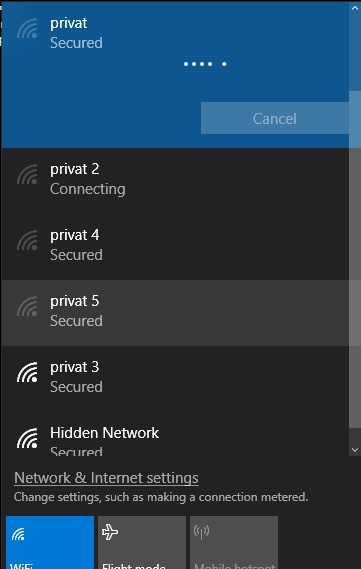
Hidden (already saved) SSID wont show on Windows 10
Hi, Pain in the ass this Netgear, just switched from TP-link thinking I would make an upgrade (stupid paid YouTube ass "revievers", comercial useless crap is what I paid nearly 300 bucks for!!)... Th...
FURRYe38
Aug 22, 2019Guru - Experienced User
Looks like this is a MS Windows issue or possible wifi adapter in this PC. The problem is Windows isn't keeping the new currnet settings correctly when it comes out of sleep.
Try a different PC or device to see if it does the same thing.
Something you'll need to contact MS about.
Good Luck.
- Netduma-FraserAug 22, 2019NetDuma PartnerIn addition to above I would suggest disabling Smart Connect on the router as it may be having an issue with that and manually connecting to 2.4GHz or 5GHz.
- LightningByteAug 23, 2019Aspirant
The windows worked fine 3 days ago within TP-link. I disabled smart connection, and after the router restart, windows showed for a brief time all of the identical credentials but just for a brief time after what, all where gone and hidden network appeared again. The problem lies on the router not on the Windows since everything worked fine with tp-link.You can see all the (identical) cedential only after you create "new" credential, after what you get showed all the rest.
- Netduma_AlexAug 23, 2019NetDuma Partner
Try some of the stuff on this page, I really do think it's a Windows problem:
https://troubleshooter.xyz/wiki/fix-windows-10-wont-remember-saved-wifi-password/