NETGEAR is aware of a growing number of phone and online scams. To learn how to stay safe click here.
Forum Discussion

P111
Oct 27, 2018Luminary
How To Set Priority For Unrecognised Games?
Am I correct in saying that a game should show as "High Priority Traffice Detected" on this picture?
What do you do if it doesn't? I guess it needs to be setup manually, but how do you do that? I m...
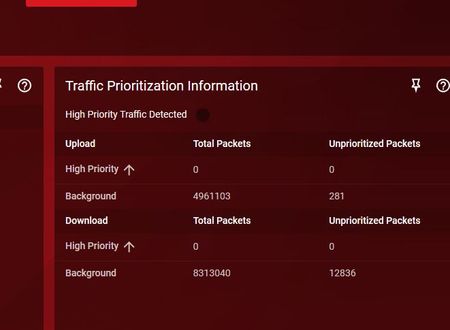
P111
Oct 27, 2018Luminary
Anyone? There is an advanced option so there must be a way!
Netduma_Jack
Oct 27, 2018NetDuma Partner
Traffic Prioritization automatically detects all console traffic, and most popular PC games. If you're not seeing it being detected, then you can manually add the ports the game rules. Click Add Device in the bottom left panel, then choose advanced. You can then give the ports from the game (Google these if you are not sure what they are).
See the final section of this guide if you get stuck: http://support.netduma.com/support/solutions/articles/16000077073-dumaos-optimal-settings-guide-qos-step-3-
- P111Oct 28, 2018Luminary
Thank you for your reply, but that article doesn't actually explain port forwarding.
It calmly states to enter the manual configuration but to a noob like me the one question I have is how?
I mean for example I have been told that for one game I need to open port 10001. But the configuration talks in terms of configuing the source and destination port. What? I mean not a single game I have mentions that information. They just give one port.
I mean this is the entire point of the XR500 to me. It's supposed to make things easy and the one key area - port forwarding, it just doesn't explain at all!
Also attempting to enter anything actually crashes.
- P111Oct 28, 2018Luminary
Sorr for splitting my last pos in two...
The error it gives is...
Error: RPC error 'ERROR_UNKNOWN': bad argument #1 to 'len' (string expected, got nil) -> stack traceback: ?: in function <?:73> [C]: in function 'len' ?: in function '?' ?: in function 'decode' ?: in function <?:50> (tail call): ? ?: in function <?:324> [C]: in function 'xpcall' ?: in function 'try' ?: in function <?:290> [C]: in function 'run' ?: in function <?:345> [C]: in function 'xpcall' ?: in function 'try' ?: in function <?:261> (tail call): ? /dumaos/api/cli.lua:48: in function </dumaos/api/cli.lua:30> [C]: in function 'xpcall' /dumaos/api/cli.lua:59: in main chunk [C]: ?
I mean this is supposed to be a gaming router, and port forwarding is not explained and crashes? SERIUOUSLY? I am just getting progressively angry with this right now. It was a lot of extra money for what seems to amount to sales hype.
- Netduma-FraserOct 28, 2018NetDuma PartnerThis is not port forwarding, that is something entirely different in settings. The guide only mentions changing the destination fields. You do not need to change the source field. If you need 10001 then as the guide says just enter that in both the start and end fields for destination. Also every feature has a ? icon on it's panel to help you understand the feature. Next version will have the fix for that in. If you need to add a manual rule then would advise downgrading for now.
