NETGEAR is aware of a growing number of phone and online scams. To learn how to stay safe click here.
Forum Discussion

chedyus
Jun 23, 2020Tutor
How to turn off remote management on XR300 ?!
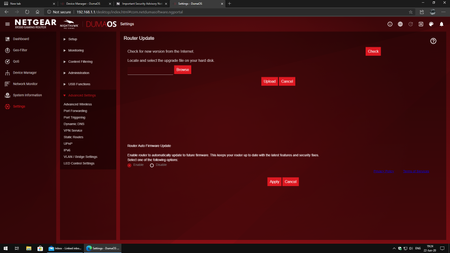
Hi there, so i just got an email about a Security Advisory Notification, in this email it says to turn off Remote Management option but i can`t find it in my settings ( see the image ) where exactly ...
chedyus
Jun 23, 2020Tutor
Netduma-Fraser wrote:
I actually don't see the option for remote management like the other XR routers so I'm not sure it has it. The only way to remotely access the interface in that case is by using the VPN Service (different to Hybrid VPN) so make sure you're not using that. Also via the mobile app so just to be safe change and make your interface and wifi passwords more difficult.
i don t use any vpn service also in the mobile app i disabled but in that email from netgear it s saying this:
"Please note that the Remote Management feature in your product Web GUI is different from the Remote Management feature in the Nighthawk app. You do not need to turn off Remote Management in the Nighthawk app and doing so will not serve as a workaround for these vulnerabilities."
So i m not sure what is going on, the whole thing is very confusing and not many useful information about this problem on my specific router ....

Netduma-Fraser
Jun 23, 2020NetDuma Partner
I think the email was generic and perhaps didn't account for the fact that the option does not seem to be present on the interface. As long as you make the changes I suggested you should be fine. A hot fix firmware for this will likely be released shortly.