NETGEAR is aware of a growing number of phone and online scams. To learn how to stay safe click here.
Forum Discussion

angry55
Dec 01, 2018Aspirant
Incomplete setup
i recently purchased the xr500
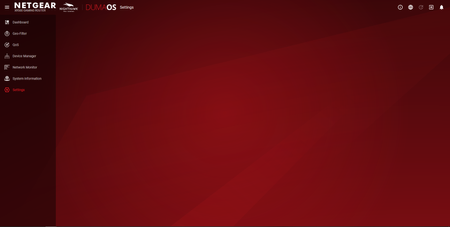
after completing the initial setup i was taken to to dumaos dashboard and attempted to configure settings
however, on clicking the settings link nothing appears (se...
angry55
Dec 03, 2018Aspirant
tried your suggestion
nothing changed
Netduma_Jack
Dec 03, 2018NetDuma Partner
I recommend you downgrade back to an older firmware, and once that's complete, upgrade to the latest version again. To do th:
- Download this firmware: https://kb.netgear.com/000059151/XR500-Firmware-Version-2-3-2-22
- Go to http://routerlogin.net/adv_index.htm
- Go to Administration then Firmware Update
- Now upload the firmware you downloaded on step 1
- Wait for installation to complete
- Now try going to routerlogin.net like normal - does Settings load now?
- Hopefully it does, if so, got Administration then Firmware Update, and then install the latest firmware: https://www.netgear.com/support/product/XR500.aspx#Firmware%20Version%202.3.2.32
If that does not fix the problem then there are two other possible causes I can think of:
- You have an adblocker/security/firewall extension preventing it from loading. Could you try temporarily disabling it to see if that fixes your problem
- You are using an incompatible browser. Try using Chrome or Firefox (if you're not already) to see if that solves it
- angry55Dec 03, 2018Aspirant
Hello,
thank you for your assistance. much appreciated
before I downgraded / upgraded the firmware I tried disabling the adblocker
this allowed me to see the settings menu in dumaos
as a precaution I downgraded / upgraded the firmware as well
I have now setup an exclusion in the adblocker and all seem to be working ok
however I still have a concern that the settings and process manger rapps still have a play button beside their names where all the other rapps have a pause button
any suggestions
- Netduma_JackDec 04, 2018NetDuma Partner
That's great news that you found the problem.
Don't worry about the play/pause icon. That's the default way we present it.