NETGEAR is aware of a growing number of phone and online scams. To learn how to stay safe click here.
Forum Discussion

JFoltz3
May 15, 2020Aspirant
Netgear nighthawk pro gaming xr500 problems with Fortnite?
So I've been having issues with Fortnite connectivity for a couple months now. I recently purchased the netgear CM1000 docsis 3.1 modem with a nighthawk xr500 router to try to give a more stable inte...

Netduma-Fraser
May 17, 2020NetDuma Partner
You need to try more combinations than that with the guide/downloads, go up/down in 10's, see what the results are. If you find one or two that are quite good then go up/down in 5's and see if you can fine tune that.
JFoltz3
May 17, 2020Aspirant
So I narrowed down the bufferbloat to 10% up and down by using the guide you gave me. I could see the ping plotter results get better as I moved down in percentage, yet I would still describe it as congested (even before I tried testing with downloads). I tried using the PS4 just for the heck of it under these settings and it was still really bad. Do you have any other suggestions?
- Netduma-FraserMay 17, 2020NetDuma PartnerIf you've found a decent level try then going in intervals of 5%, could I see the PingPlotter result of what you have please so I can see where we are at and go from there.
- JFoltz3May 17, 2020Aspirant
- JFoltz3May 17, 2020Aspirant
- JFoltz3May 17, 2020Aspirant
Both of these tests are on the 10% up and down bufferbloat. The first one is with no downloading happening. The second is with downloading happening.
- JFoltz3May 17, 2020Aspirant
The results were much worse when using higher bufferbloat percentages.
- Netduma-FraserMay 18, 2020NetDuma PartnerWhat is the target you're pinging? Your starting point is huge, so that will dictate the baseline at what QoS could achieve. Could you provide a full screenshot of the PingPlotter window please? Could you also do one direct to the modem please?
- JFoltz3May 18, 2020Aspirant
- JFoltz3May 18, 2020Aspirant
- JFoltz3May 18, 2020Aspirant
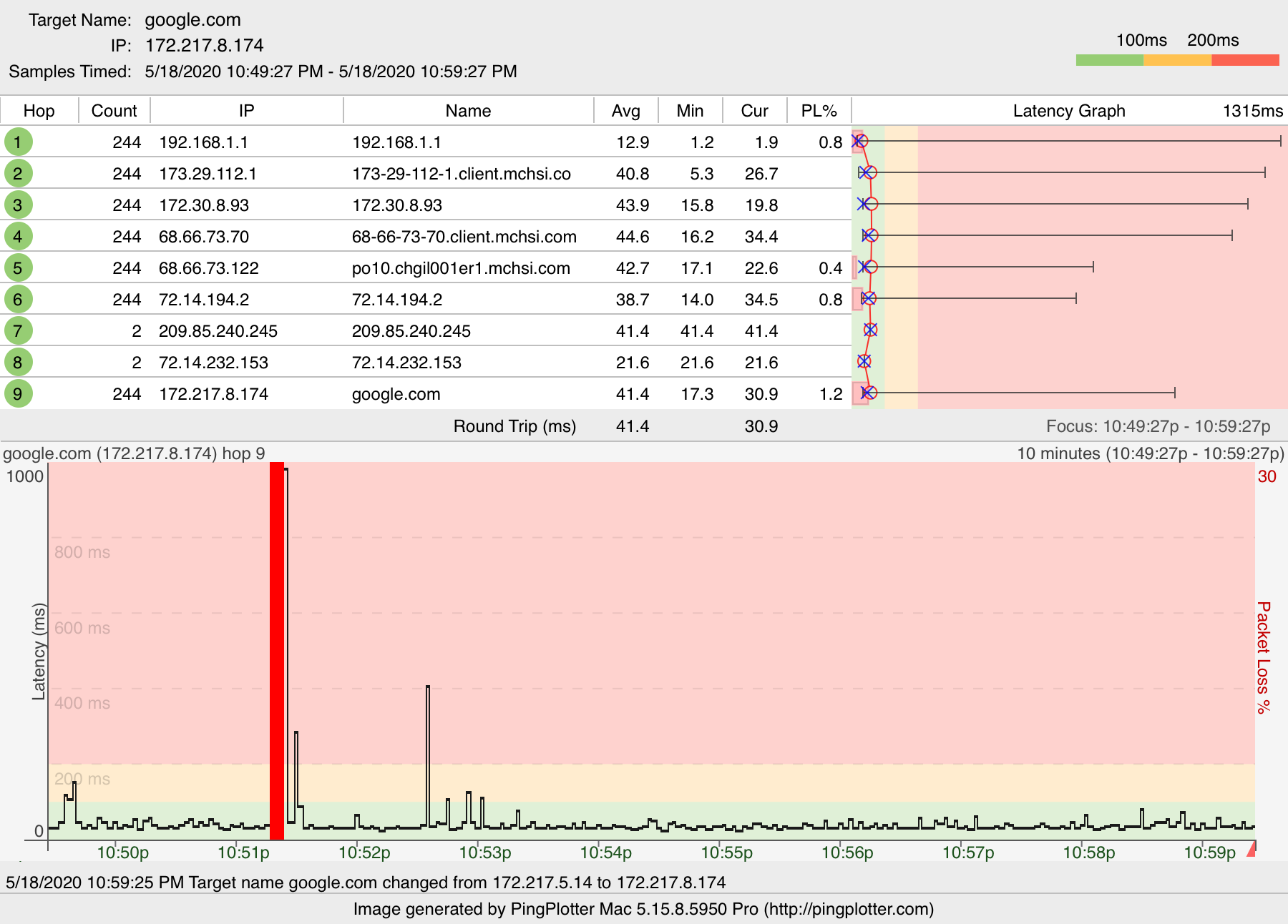
Alright, so I retested with the router active in the first one with no downloads going on and tested straight from the modem in the second picture. The original tests I sent you were directed to the aws server for fortnite. I decided to do the retest directed to google.com. So both of these fresh ones are directed to google. If you need me to retest the first one again, then let me know. That large ping jump/packet loss may interfere with you looking at the results. Again, when I try to play games from the modem, it is significantly better.
- Netduma-FraserMay 19, 2020NetDuma PartnerI'm surprised it is much better through the modem to be honest, still getting massive spikes. Could you disable IPv6 on the XR and the modem please and see if that improves it first of all. The issues seem to lie on the hops away from your home.
- JFoltz3May 19, 2020Aspirant
The XR500 IPv6 was already disabled and I don't see an option to disable it in the modem. The modem does however say that the IP provisioning mode's status is Honor MDD with a comment of IPv4 only. I'm assuming this means that the modem isn't using IPv6 either.
- Netduma-FraserMay 20, 2020NetDuma PartnerYour modem only plot was done using IPv6, whats the model of your modem/router?
- JFoltz3May 20, 2020Aspirant
Netgear CM1000 docsis 3.1 modem
- Netduma-FraserMay 20, 2020NetDuma PartnerOkay lets go the other way and enable IPv6 on the XR and see if it is any better at all.
- JFoltz3May 20, 2020Aspirant
Which setting should I put it on for the IPv6 of the XR500? The options are auto detect, auto config, 6to4 Tunnel, 6rd, Pass Through, Fixed, DHCP, and PPPoE.
- Netduma-FraserMay 20, 2020NetDuma PartnerGo for Auto Detect as we're not sure what those settings are specifically.
- JFoltz3May 20, 2020Aspirant
I did auto detect and then proceeded to run a ping plotter test. The results were the same as before, maybe even worse. There was however some settings within the auto detect that I had no idea what to do with. I will link a picture. Each different mode that I described in the previous post had its own unique settings like it does for the auto detect.
- JFoltz3May 20, 2020Aspirant
- Netduma-FraserMay 20, 2020NetDuma PartnerEnable the DHCP Server option instead of Auto Config. Then also change IPv6 Filtering to Open. I'm also thinking lets change DNS as well, select use these DNS Servers and input these for Primary and Secondary:
2606:4700:4700::1111
2606:4700:4700::1001
Then apply. Also in Internet Setup change the DNS to 1.1.1.1 and 1.0.0.1 and apply. Then redo your tests, one with IPv6 enabled and one without it please using the same 45% you had before. - JFoltz3May 20, 2020Aspirant
First one is with IPv6 and the second is without.
- JFoltz3May 20, 2020Aspirant
- JFoltz3May 20, 2020Aspirant
- Netduma-FraserMay 21, 2020NetDuma PartnerNot much difference there unfortunately, it does look like you're doing it during peak times. If you do the test later on or earlier is there any differences?
- JFoltz3May 21, 2020Aspirant
Just did it at 10:30pm and it was just as bad.
- Netduma-FraserMay 26, 2020NetDuma PartnerThrough all this, what ping are you seeing on the Geo-Filter and the game if you enable ping stats? Do you see it spike much?