NETGEAR is aware of a growing number of phone and online scams. To learn how to stay safe click here.
Forum Discussion

FILIPINOY79
Nov 28, 2018Tutor
Nighthawk x6 readyshare still shows in windows after upgrading to XR500
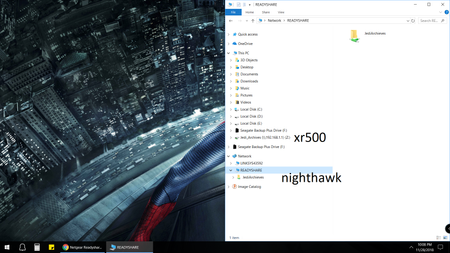
Recently i upgraded to the XR500 from a Nighthawk X6 AC3200. For some reason the computer still shows the original readyshare hard drive JediArchieves. I do see the new one on the left pane, but I ...
Netduma_Jack
Nov 29, 2018NetDuma Partner
Hi - not sure about this one myself, I assume you have reset your PC already?
Might be worth contacting NETGEAR's official support on this one: https://www.netgear.com/support/contact.aspx
FILIPINOY79
Nov 29, 2018Tutor
Well i got it where it shows under readyshare, but the first one was the Nighthawk x6 one, and the one on the right is the one from the XR500. Still can't delete the old one
- FILIPINOY79Nov 29, 2018Tutor
So, i've reset the router to factory settings, and the old drive appears. I've restarted the computer, and rebooted the router. Now i'm using DBAN to wipe the drive itself.
- Netduma_JackNov 30, 2018NetDuma Partner
I should think it's a Windows issue, rather than a router issue, but I'm not sure!