NETGEAR is aware of a growing number of phone and online scams. To learn how to stay safe click here.
Forum Discussion

iamsotorious
Jan 14, 2019Aspirant
Nighthawk XR700 not getting full gigabit speeds
Hello.
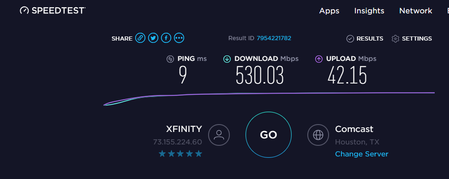
I purchased a nighthawk righter earlier this month and i have not been able to achieve gigabit speeds.
attached screenshots show after multiple test.
I have updated firmware ...

FURRYe38
Jan 15, 2019Guru - Experienced User
What FW is currently loaded?
What is the Mfr and model# of the ISP modem the NG router is connected too?
How are you speed testing? wired or wireless?
Try different PC to see any differences?
You might try this, manually download the FW file. Manually send it using IE11, FF or Opera.
Factory reset the router with a wired PC and ALL other devices disconnected from the router. While the Router is being reset. Power OFF the ISP modem for 30 seconds, then turn it back on.
Log into the router and walk thru the setup wizard. See if the auto detect speed gets anything hear 900Mb. If not manully input ISP speed UP and down. Then test with a web browser with speedtest.net or your ISP speed test site.
iamsotorious
Jan 15, 2019Aspirant
I have an Arris Surfboard SB8200 docsis 3.1
https://www.amazon.com/Next-Generation-ARRIS-Surfboard-SB8200-DOCSIS/dp/B01N6SKK1G
Firmware is the latest one out, if i do check updatesi dont get any newer ones, i had the firmware right before this or whatever it shipped with. Still same issue on both firmwares.
Its modem, router, then computers
Everything is wired tested. I have tried 3 different computers, each computer varys a bit but still sub par of 900 mbps
When i speed test through the app i do get a lot higher maybe like 740s with the nighthawk app to the router, but never see that on the comptuers and still it slike the router is not capable of hitting 1gbps?
When i first did the setup wizzard never showed me speeds but that could be because i accidently clicked 10gb port and had to go into the router and change it.
I guess i need to try the reset and see if that would work, now which version of the firmware should i try the most recent one and try to upload it to the router manually and see if that also helps? Just make sure its not chrome that im doing it with. I am a bit skeptical but at this point might as well try it, its that or just return the router.