NETGEAR is aware of a growing number of phone and online scams. To learn how to stay safe click here.
Forum Discussion

iamsotorious
Jan 14, 2019Aspirant
Nighthawk XR700 not getting full gigabit speeds
Hello.
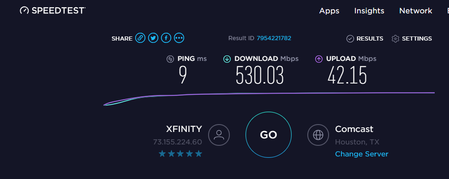
I purchased a nighthawk righter earlier this month and i have not been able to achieve gigabit speeds.
attached screenshots show after multiple test.
I have updated firmware ...
iamsotorious
Jan 15, 2019Aspirant
Also how do you manually enter the speeds, or can this only be done during the initial setup wizard of the router?

Rick6922
Jan 16, 2019Luminary
go to QoS ,click on the three bars at top left of page beside anti-bufferbloat,click on speed that its showing and change.
- Netduma-FraserJan 16, 2019NetDuma PartnerRick is correct.
What did you get after you reset the router? You said you disable QoS, was this from Anti-Bufferbloats options menu that specifically has an option called Disable QoS? If not do that and you should absolutely get much close to your expected speeds- iamsotoriousJan 16, 2019Aspirant
After reset i still get the same QOS is disabled yes i disbaled it from the 3 dashes and clicked it. 500-600. I saw the speed test shows 750 on router, i then inputed 950 and re tested again but still getting 500-600
i have cat 5e cable from mdoem to router, and cat 6 cable coming out ot my computer.
- Netduma_JackJan 17, 2019NetDuma Partner
Hi - if you connect the same PC (and Ethernet cable) to your Modem, do you get your full speeds wired? Have you tried factory resetting your router and setting it up again?
