NETGEAR is aware of a growing number of phone and online scams. To learn how to stay safe click here.
Forum Discussion

iamsotorious
Jan 14, 2019Aspirant
Nighthawk XR700 not getting full gigabit speeds
Hello.
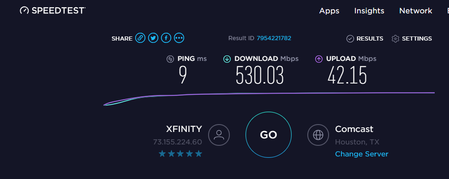
I purchased a nighthawk righter earlier this month and i have not been able to achieve gigabit speeds.
attached screenshots show after multiple test.
I have updated firmware ...

FURRYe38
Jan 22, 2019Guru - Experienced User
Yes, I would factory reset and setup from scratch. Power OFF the ISP modem as well during this process. Walk thru the setup wizard. see if the wizard auto detects the speed correctly, if not, go in and manually set it, then run a speed test before and after making changes.
iamsotorious
Jan 22, 2019Aspirant
Someone already suggested that in this thread i did that. At the beginning of the reset i as only getting 34mpbs and i restarted and got low 500s. After that i loaded my old settings back in.
- Netduma_JackJan 23, 2019NetDuma Partner
If you're getting half speeds after factory reset, then it will be someting to do with the modem passing the connection onto the XR700.
Please try toggling the modem between modem mode (or bridge mode) and off again. Speedtest on each setting through the XR700 and see if there is a difference.