NETGEAR is aware of a growing number of phone and online scams. To learn how to stay safe click here.
Forum Discussion

ron_spruce
Jan 31, 2023Star
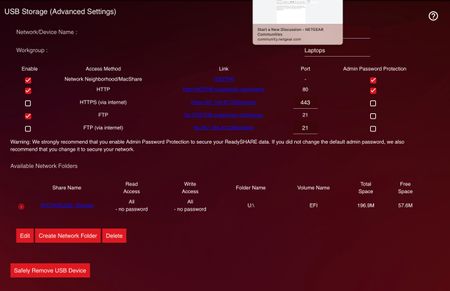
ReadySHARE Storage < 200 MB
Posting here since Netduma does not handle ReadyShare troubleshooting. I have a NETGEAR XR1000 Nighthawk Pro Gaming Router and a compatible external hard drive (WD My Book 2 TB model WDBYCC0020HBK-N...

Netduma-Fraser
Jan 31, 2023NetDuma Partner
As you know this isn't within our expertise but I'll jump in to try and get the ball rolling. You have a folder there, USB_Storage, is that a folder you have created on the drive? From what I've seen you need to have one folder that all files are then contained within otherwise it may not work correctly so if you haven't already make sure all files are in that folder/create one.
Another thing, it could quite simply come down to the fact that your drive isn't supported/hasn't been tested. I realize the XR1000 isn't listed in this supported drive list but the R9000 & XR500 you can look at and that should apply https://kb.netgear.com/18985/Which-USB-drives-are-verified-to-work-with-NETGEAR-ReadySHARE?article=18985 maybe it would be worth trying one of these drives and seeing if it works? There does appear to be this one WD My Book Essential 4TB / PN:WDBACW0040HBK-H11 that is in the same family as the one you currently have.
Another thing, it could quite simply come down to the fact that your drive isn't supported/hasn't been tested. I realize the XR1000 isn't listed in this supported drive list but the R9000 & XR500 you can look at and that should apply https://kb.netgear.com/18985/Which-USB-drives-are-verified-to-work-with-NETGEAR-ReadySHARE?article=18985 maybe it would be worth trying one of these drives and seeing if it works? There does appear to be this one WD My Book Essential 4TB / PN:WDBACW0040HBK-H11 that is in the same family as the one you currently have.

ron_spruce
Jan 31, 2023Star
When I checked the HDD there were no folders within it as I had reformatted it to AFPS (non encrypted). I then made a new folder named USBStorage and also renamed the HDD that:
Seems like you might be right about this being unsupported. I'm hoping that the next one I buy doesn't have the same problem.
 Netduma-LiamFeb 01, 2023NetDuma Partner
I'm afraid we can't see that screenshot just yet as it's not been moderated. Perhaps try attaching it to the post instead of pasting it in?
Are there any partitions on the drive that match the size your router appears to be detecting? If so, is that partition any different in terms of formatting etc to the one you're trying to mount here?
- ron_spruceFeb 01, 2023Star
There is just one partition that I can tell from Disk Utility. I'm going to do a factory reset on my router for another issue and then try this again. Are there any well-written setup tutorials on this community board that you recommend I use?
- Netduma-LiamFeb 01, 2023NetDuma Partner
In terms of setup tutorials for readySHARE specifically, I'm not aware of any, you could try following this if you haven't already:
https://kb.netgear.com/20129/Creating-a-ReadySHARE-Network-Folder-and-Permission-Editing
In terms of setup guides for DumaOS, you can find all of our optimal settings guides here:
https://support.netduma.com/support/solutions/folders/16000090646