NETGEAR is aware of a growing number of phone and online scams. To learn how to stay safe click here.
Forum Discussion

bacevedo
Nov 27, 2018NETGEAR Employee Retired
What Is Anti-buffer Bloat?
What the $%&*! is Anti-buffer bloat??
Hey Nighthawks,
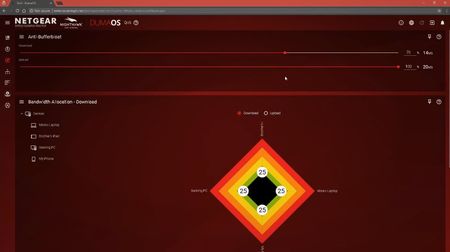
Here's a quick explanation of one of the most powerful features in the OS that powers our Nighthawk Pro Gaming routers, anti-buffer b...

gwager08
Dec 29, 2018Aspirant
How does lowering sliders to 70% reduce congestion? By doing so the bandwidth at the same time is reduced according to numerous speed tests online. The whole reason to have faster up and download speed is to have more devices connected without any buffer problems/ less congestion. So how does Antibuffer-bloat provide a better gaming experience when reducing sliders means reducing overall bandwidth? How does this make any sense especially with Qos burger graph to allocate bandwidth prioritization?

Netduma-Fraser
Dec 30, 2018NetDuma Partner
You can use the ? icons on the router panels and they will explain each feature in more detail and how to use it. In short though, downloads will always go as fast as they can so it doesn't matter if you have more bandwidth the download will go just as fast as that and still cause you lag. By effectively telling the router that 70% is your new maximum it ensures theres headroom so that your connection cannot be saturated and therefore is room for gaming and other applications etc. All devices can use the internet as normal. Speed test results being the only downside but everything will run fine regardless of that. Bandwidth Allocation will provide bandwidth using whatever the available total is according to your Anti-Bufferbloat settings.
- gwager08Dec 31, 2018AspirantSo essentially, if you set your sliders to 70%, the other 30% isn’t used for anything?
- Netduma_JackJan 02, 2019NetDuma Partner
That's correct. So you may want to increase it to 80% or 90% once you're comfortable with your setup. I wouldn't recommend going above 90% though because if your ISP underprovides against your speeds it will mean Anti-Bufferbloat will no longer be taking affect.
- gwager08Jan 02, 2019AspirantI don’t understand the added benefits to reducing overall bandwidth and having 30% essentially wasted. I get the sliders on each module give an explanation but what’s the science behind it? What exactly does reducing overall available bandwidth benefit to the gaming experience? If devices are hogging bandwidth at 100% of availability, then it seems that they would most certainly being doing the same at a lower percentage. I’m not convinced that it really does anything at this point and just more of a commercial gimmick at this point. On the surface of things, that’s like saying you worked 40 hours but are only getting paid for 28. Please help me understand this concept.