NETGEAR is aware of a growing number of phone and online scams. To learn how to stay safe click here.
Forum Discussion

Zihong
Jan 18, 2025Aspirant
Why does my XR500 Router have not Wi-Fi signal?
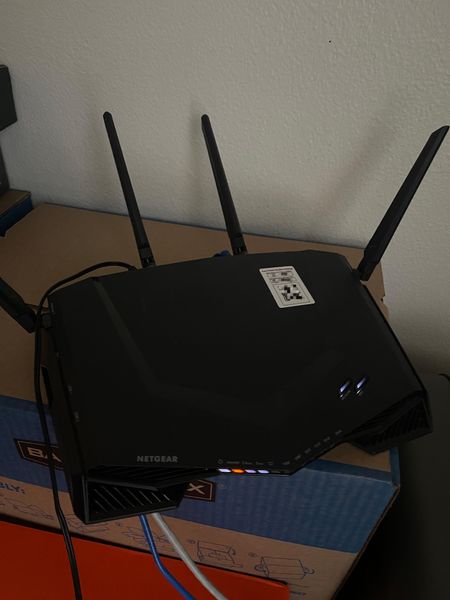
I just installed my XR500 Router and I couldn't detect the Wi-Fi signal. The status of the router is below. All the LEDs worked well and Wi-Fi switch is on. I have tried several attempts of reset, bu...
Zihong
Jan 19, 2025Aspirant
Thank you so much for your detailed reply. Well, both my laptop and iPhone cannot find the Wi-Fi signal. I also used the app to help me connect to the router, but it also failed because of the undetected signal.
Since I can't connect the router with Nighthawk app or the browser interface, I'm then not sure what version the firmware is. Is there any way to update the firmware without the app or browser interface?
The router is connected to the CAT 6 port of the apartment, which has no problem I think.
I'd also look into previous cases that may help. Thank you again for your support.

michaelkenward
Jan 20, 2025Guru - Experienced User
Zihong wrote:
The router is connected to the CAT 6 port of the apartment, which has no problem I think.
That makes it hard to diagnose your Internet connection. Those apartment networks may feed off of a router somewhere in the basement. So the usual modem settings may not work. You have to ask the landlord how to connect to that network.
That doesn't account for the absence of any wifi signal. You should see the SSID network and default password on the label on the bottom of the router.
You said that you have made several attempts to reset the router. Is this what you did?
How do I perform a factory reset on my NETGEAR router? | Answer | NETGEAR Support
Just another user with time on their hands.