NETGEAR is aware of a growing number of phone and online scams. To learn how to stay safe click here.
Forum Discussion

CrossCarrier
Feb 20, 2020Aspirant
XR 450 Wifi Speed slower than Wired
I have a XR450, and theoritcally a 5ghz should be able to go past 300MBS right? I'm standing right next my router and I am pretty sure I turned off all of those settings which might limit speed. I'm ...

Netduma-Fraser
Feb 20, 2020NetDuma Partner
If there are wireless devices such as phones, headsets etc within close proximity of the router than can interfere with the signal so move any of these devices at least 3 feet away. Also use a WiFi analyzer to find the least congested channel and then change to that and redo the speed test.
- CrossCarrierFeb 20, 2020Aspirant
Netduma-Fraser wrote:
If there are wireless devices such as phones, headsets etc within close proximity of the router than can interfere with the signal so move any of these devices at least 3 feet away. Also use a WiFi analyzer to find the least congested channel and then change to that and redo the speed test.Does DUMAOS have a wifi anazlyer?
- CrossCarrierFeb 20, 2020Aspirant
Netduma-Fraser wrote:
If there are wireless devices such as phones, headsets etc within close proximity of the router than can interfere with the signal so move any of these devices at least 3 feet away. Also use a WiFi analyzer to find the least congested channel and then change to that and redo the speed test.My channel is by itself, it is not congested. It is the only one on its channel... and there are no other devices in a 3 feet proximity.
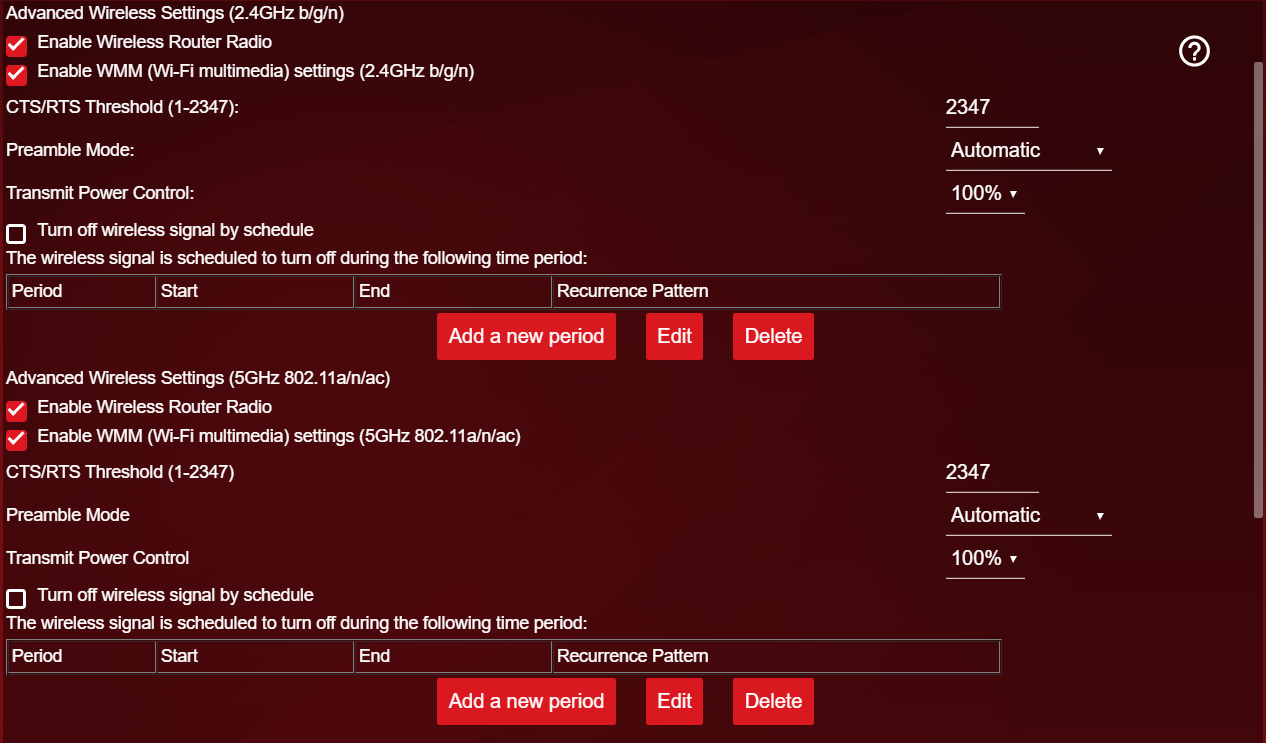
- Netduma-FraserFeb 20, 2020NetDuma PartnerNo it doesn't have a wireless analyzer. Could you provide a screenshot of your Advanced WiFi Settings please? Also double check you've done everything in this guide: http://support.netduma.com/en/support/solutions/articles/16000076586-dumaos-optimal-settings-guide-maximum-bandwidth-speeds
- CrossCarrierFeb 20, 2020Aspirant
Netduma-Fraser wrote:
No it doesn't have a wireless analyzer. Could you provide a screenshot of your Advanced WiFi Settings please? Also double check you've done everything in this guide: http://support.netduma.com/en/support/solutions/articles/16000076586-dumaos-optimal-settings-guide-maximum-bandwidth-speedsI followed the guide but it still hasn't worked :/ The rest of the settings is all checked. I can't add two pictures for some reason.