NETGEAR is aware of a growing number of phone and online scams. To learn how to stay safe click here.
Forum Discussion

peakitf
Dec 13, 2022Apprentice
XR1000 ping spikes, poor connection and bufferbloat
I bought an XR1000 and I got a modem from my ISP rather than a router as it should logically be better.(?) My house has Fiber-Optic wired to the house but the modem is connected with a coax cable an...

Netduma-Fraser
Dec 22, 2022NetDuma Partner
One big download and a Twitch stream for example should give you the spikes. Good results will differ for each connection, for you a good result will be getting the results when under load to look as close as possible to what your results are like with barely anything using the internet
peakitf
Dec 23, 2022Apprentice
Little issue here, I'm not actually able to limit my download speed with Congestion Control, I've set my PC to 42% and my streaming PC to 42%, the rest on 5. Congestion Control is combined with the 42% equals 100mbps, my download is at 480+ as always. Fairly sure I should be having less than 100 for it to show that it's atleast working, that makes me wonder if QoS is even doing its thing as well.
- Netduma-FraserDec 23, 2022NetDuma PartnerCan you provide a screenshot of your QoS page please?
- peakitfDec 23, 2022Apprentice
I've attached it, nothing seems to change when I use the sliders, QoS is enabled as well as Goodput.
- Netduma-FraserDec 23, 2022NetDuma PartnerAhh I see, Bandwidth Allocation doesn't limit bandwidth unless you disable Share Excess in the Bandwidth Allocation menu.
- peakitfDec 23, 2022Apprentice
So everything works as intended, including QoS? I've got no idea how to know if QoS works, other than that I'm assuming the sliders will now have the intended effect?
- peakitfDec 23, 2022Apprentice
It's always misbehaving for me, now my download speed to Waveform's bufferbloat test is stuck to 200 and upload to 2, I can't seem to make it work no matter what I do, at the minute I have Congestion Control disabled to start from scratch but it doesn't change the speeds, nothing really takes effect.
- Netduma-FraserDec 23, 2022NetDuma PartnerYes as far as I can see, if you want to limit Bandwidth overall then use Congestion Control - this is the main tool to eliminate lag/bufferbloat. If you want to assign bandwidth as a hard limit you'll need to disable share excess but all devices will then be hard limited to the allocation of the available bandwidth. If QoS is working then you may not notice it at all as it will be keeping your connection stable, preventing lag should any devices download when gaming etc. If you want to learn more I'd recommend having a look at our optimal settings guides: https://support.netduma.com/en/support/solutions/folders/16000090646
- peakitfDec 23, 2022Apprentice
I'll give that a go, ideally I'd want to be able to stream at the same time though.
- peakitfDec 23, 2022Apprentice
Yeah I'm unable to control this router, my download speeds sometimes show above 500 which I don't have and sometimes it sits itself back at 200, bufferbloat is out of control, not really sure how to tackle this.
- Netduma-FraserDec 23, 2022NetDuma PartnerWhat are your expected speeds? Most providers do give a little over the expected speed in some cases. If that is without QoS so completely disabled then your fluctuation in speeds is unlikely to be the router - where are you testing the speeds exactly?
- peakitfDec 23, 2022Apprentice
I was messing around with the sliders and I did Waveform's Bufferbloat test and speedtest.net by Ookla to confirm that it works as intended and at one point my download speed was 800, and I can't really tell what went wrong. I saw Fr33thy had a video where he had bandwith share enabled, default settings basically and he managed to get +0 +0 on Waveform's test right after doing absolutely nothing, so I can't really tell what went wrong.
Speeds I pay for are 500 and 50, speeds in my old router were set to 512 and 51.2
- Netduma-FraserDec 23, 2022NetDuma PartnerI would suggest following the guide to get maximum bandwidth speeds, then do some testing over the day and see what speeds you get, if it wildly fluctuates then take the average and set that as what you expect. Then from there follow the optimal settings guide for setting up QoS and see how you get on.
- peakitfDec 23, 2022Apprentice
Speeds are consistent now, and they adjust accordingly to congestion control however not a single number from 100% to 1% provides me with a suitable bufferbloat result, it's always a horrible +15 at best, won't get lower than that.
After giving up for a minute I tested the connection in a game of Counter-Strike, no bullets hit for me, people kill me while sprinting in a straight line and most of the time I don't see them, playing from my neighbours house never provided this kind of gameplay, I'm hoping it's safe to assume that bufferbloat causes that kind of gameplay.
- Netduma-FraserDec 23, 2022NetDuma PartnerAre you testing bufferbloat on Connection Benchmark? What is your ping to the game? Are you using the Geo-Filter?
- peakitfDec 23, 2022Apprentice
No Geo Filter in particular, I've set my address and left it default, I tried the Connection Benchmark and Waveform's test, my ingame ping looks decent, quite low however the bufferbloat in tests is still present and it seems like it plagues my gameplay.
- Netduma-FraserDec 23, 2022NetDuma PartnerDid you add your device to the Geo-Filter? Can you provide a screenshot of a completed Benchmark and waveform test please? What is the in game ping exactly? Bufferbloat only occurs when the connection is saturated, if not much is happening on the network at the time other than gaming it's unlikely to be impacting you.
- peakitfDec 23, 2022Apprentice
I've attached a screenshot of my Waveform bufferbloat test and a few others along the way considering I can only add one at a time.
I've now defaulted everything and set up my router so that I can try to find the sweet-spot to hopefully lower bufferbloat, that way I plan to allocate that speed to my gaming PC, and the rest to my Streaming PC which I hope isn't an awful logical approach, regardless I'm still the only internet user in this house.
- peakitfDec 23, 2022Apprentice
Here's my Geo-Filter for the games I play.
- peakitfDec 23, 2022Apprentice
The benchmark in the router.
- peakitfDec 23, 2022Apprentice
These are my congestion Control settings with sharing excess disabled, I've set it up like this so that I can dedicate everything to finding a good setting to reduce bufferbloat, I've set my download speeds as the highest speeds a speedtest can do which is usually around 490 download and 49 upload, rather than my 500/50.
- Netduma-FraserDec 23, 2022NetDuma PartnerI'd recommend you leave Bandwidth Allocation as the default, that won't get rid of bufferbloat, that is what Congestion Control is for. Gaming barely uses any bandwidth so certainly doesn't need such a big allocation. Go down in intervals of 10 for the Congestion Control percentages then run a benchmark, continue that process until you find values that allow the Ping Under Load graph to look as close as possible to the Ping Test graph.
- peakitfDec 24, 2022Apprentice
So my settings are good so far? Upload/Download Share Excess both disabled to make proper use of congestion control, seems like I've gotten some stability so far, I'll play with the slider again and see if it works this time around.
Thanks a lot for the help so far by the way, I'll report back once I'm finished.
- peakitfDec 24, 2022Apprentice
I've now been through every single increment of 5% on both download and upload over 2 hours, one actually gave me a good 95'th percentile, the in-built router benchmark shows almost the same results everytime with mild variations but the waveform bufferbloat just doesn't really budge unless I do a benchmark at the right time.
The one good result I had could not be recreated when repeating the test with the same settings and I'm not sure why there's such massive variations in ping.
I've linked my best test result which was at 35mbps/5mbps from the in-built benchmark in attachments.
- peakitfDec 24, 2022Apprentice
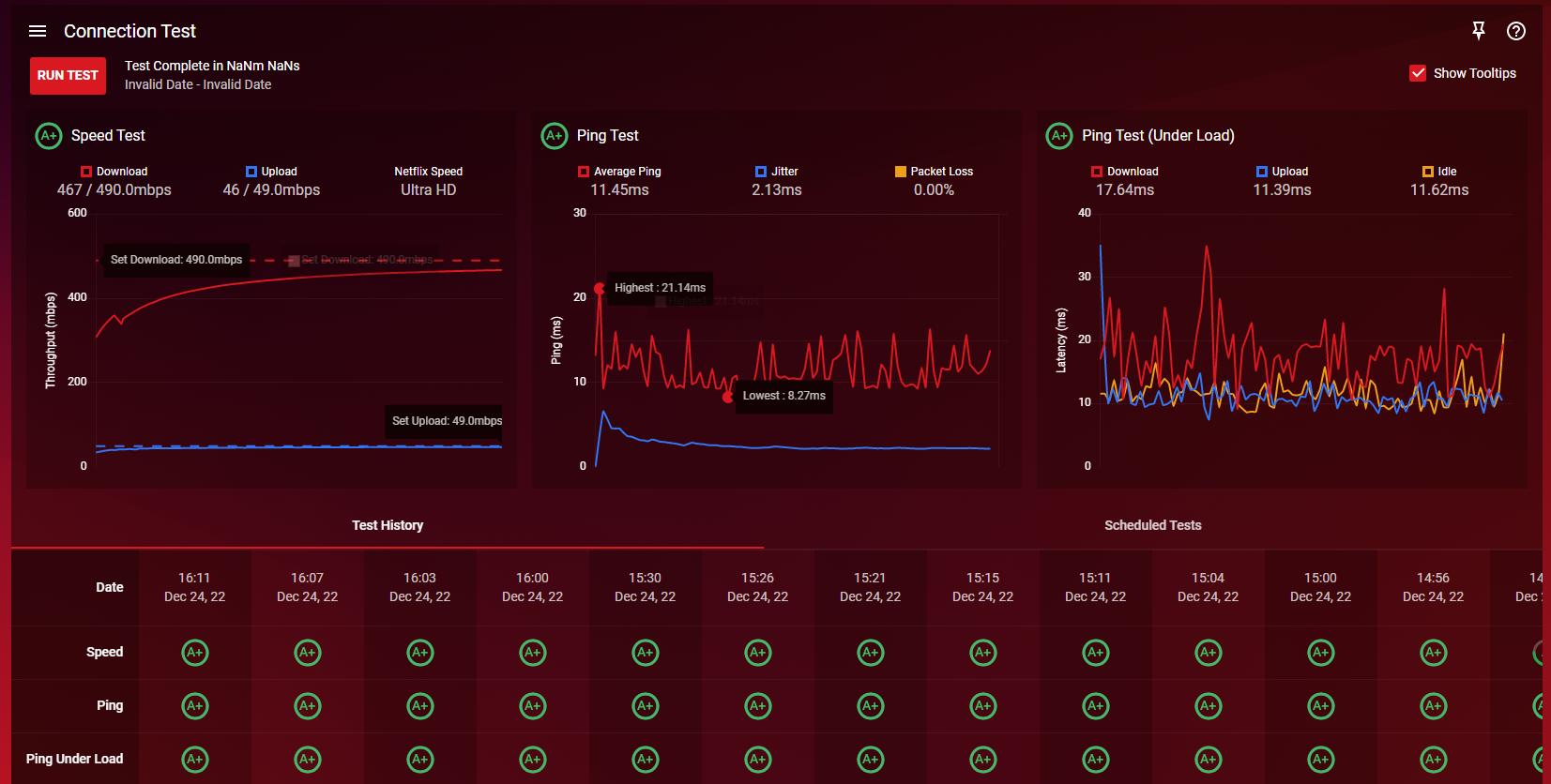
I've just done a test at maximum speeds with an without QoS enabled as well as goodput disabled, it looks like QoS is not working as intended.
Above is with QoS enabled, below is QoS disabled.
- Netduma-FraserDec 24, 2022NetDuma PartnerI would suggest enabling Share Excess so Bandwidth Allocation is at the default, otherwise when you're throttling with Congestion Control you're throttling it even more, then try it. We're still improving the results on Benchmark so that may be why it isn't reflecting changes as much, use this guide while saturating the connection with downloads/streams etc and change percentages to find the best. https://support.netduma.com/en/support/solutions/articles/16000074717-how-to-test-your-internet-ping
- peakitfDec 24, 2022Apprentice
I'll test it with pingplotter instead, but pingplotter doesn't show the same disturbing spikes which I think cause my ingame de-sync, also I still have a modem which is on a list of bad modems, I think it plays a huge role in this case. It's an arris tm3402.