NETGEAR is aware of a growing number of phone and online scams. To learn how to stay safe click here.
Forum Discussion

peakitf
Dec 13, 2022Apprentice
XR1000 ping spikes, poor connection and bufferbloat
I bought an XR1000 and I got a modem from my ISP rather than a router as it should logically be better.(?) My house has Fiber-Optic wired to the house but the modem is connected with a coax cable an...
peakitf
Dec 23, 2022Apprentice
No Geo Filter in particular, I've set my address and left it default, I tried the Connection Benchmark and Waveform's test, my ingame ping looks decent, quite low however the bufferbloat in tests is still present and it seems like it plagues my gameplay.

Netduma-Fraser
Dec 23, 2022NetDuma Partner
Did you add your device to the Geo-Filter? Can you provide a screenshot of a completed Benchmark and waveform test please? What is the in game ping exactly? Bufferbloat only occurs when the connection is saturated, if not much is happening on the network at the time other than gaming it's unlikely to be impacting you.
- peakitfDec 23, 2022Apprentice
I've attached a screenshot of my Waveform bufferbloat test and a few others along the way considering I can only add one at a time.
I've now defaulted everything and set up my router so that I can try to find the sweet-spot to hopefully lower bufferbloat, that way I plan to allocate that speed to my gaming PC, and the rest to my Streaming PC which I hope isn't an awful logical approach, regardless I'm still the only internet user in this house.
- peakitfDec 23, 2022Apprentice
Here's my Geo-Filter for the games I play.
- peakitfDec 23, 2022Apprentice
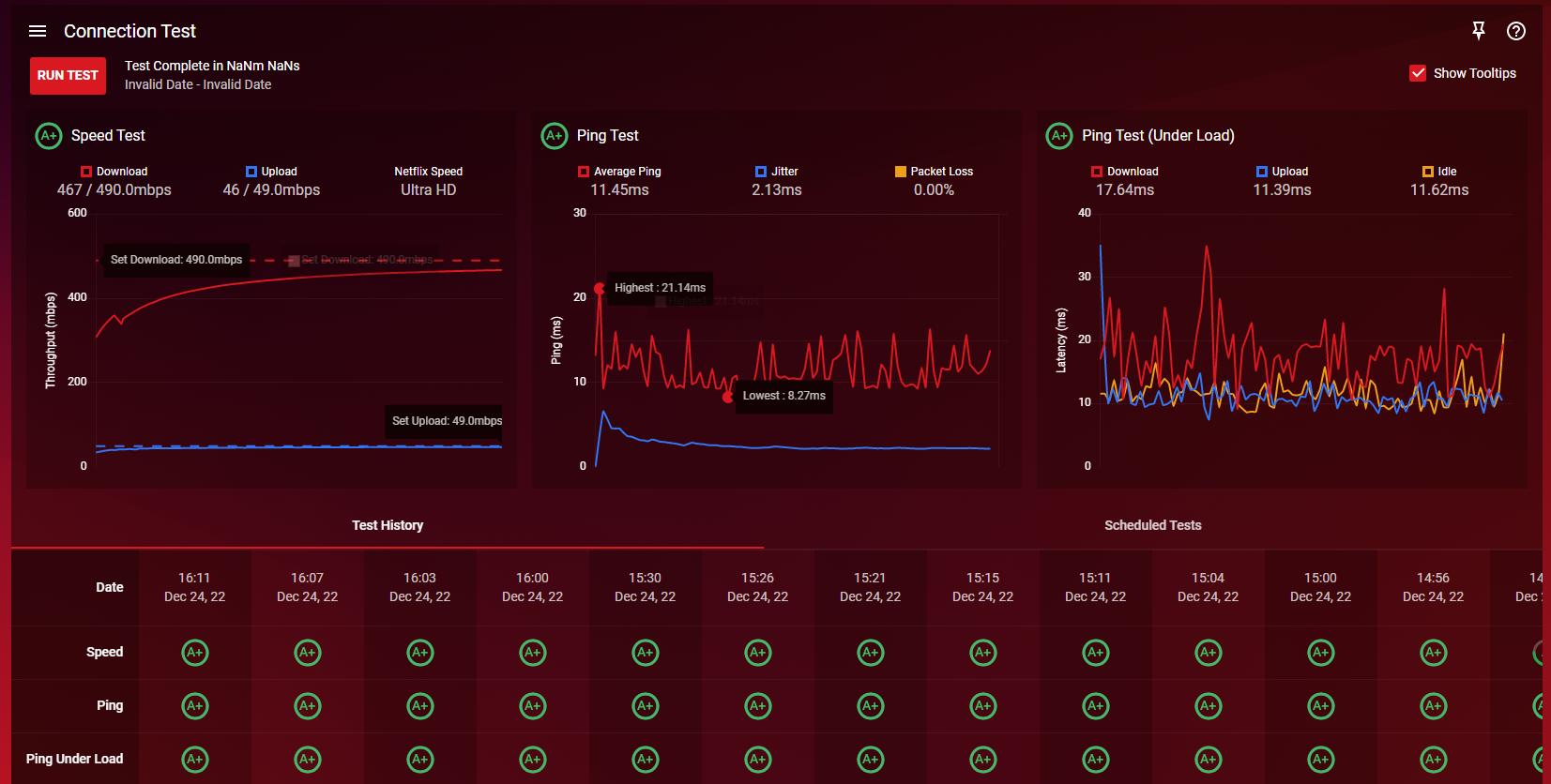
The benchmark in the router.
- peakitfDec 23, 2022Apprentice
These are my congestion Control settings with sharing excess disabled, I've set it up like this so that I can dedicate everything to finding a good setting to reduce bufferbloat, I've set my download speeds as the highest speeds a speedtest can do which is usually around 490 download and 49 upload, rather than my 500/50.
- Netduma-FraserDec 23, 2022NetDuma PartnerI'd recommend you leave Bandwidth Allocation as the default, that won't get rid of bufferbloat, that is what Congestion Control is for. Gaming barely uses any bandwidth so certainly doesn't need such a big allocation. Go down in intervals of 10 for the Congestion Control percentages then run a benchmark, continue that process until you find values that allow the Ping Under Load graph to look as close as possible to the Ping Test graph.
- peakitfDec 24, 2022Apprentice
So my settings are good so far? Upload/Download Share Excess both disabled to make proper use of congestion control, seems like I've gotten some stability so far, I'll play with the slider again and see if it works this time around.
Thanks a lot for the help so far by the way, I'll report back once I'm finished.
- peakitfDec 24, 2022Apprentice
I've now been through every single increment of 5% on both download and upload over 2 hours, one actually gave me a good 95'th percentile, the in-built router benchmark shows almost the same results everytime with mild variations but the waveform bufferbloat just doesn't really budge unless I do a benchmark at the right time.
The one good result I had could not be recreated when repeating the test with the same settings and I'm not sure why there's such massive variations in ping.
I've linked my best test result which was at 35mbps/5mbps from the in-built benchmark in attachments.
- peakitfDec 24, 2022Apprentice
I've just done a test at maximum speeds with an without QoS enabled as well as goodput disabled, it looks like QoS is not working as intended.
Above is with QoS enabled, below is QoS disabled.
- Netduma-FraserDec 24, 2022NetDuma PartnerI would suggest enabling Share Excess so Bandwidth Allocation is at the default, otherwise when you're throttling with Congestion Control you're throttling it even more, then try it. We're still improving the results on Benchmark so that may be why it isn't reflecting changes as much, use this guide while saturating the connection with downloads/streams etc and change percentages to find the best. https://support.netduma.com/en/support/solutions/articles/16000074717-how-to-test-your-internet-ping
- peakitfDec 24, 2022Apprentice
I'll test it with pingplotter instead, but pingplotter doesn't show the same disturbing spikes which I think cause my ingame de-sync, also I still have a modem which is on a list of bad modems, I think it plays a huge role in this case. It's an arris tm3402.
- Netduma-FraserDec 24, 2022NetDuma PartnerIf it doesn't show the spikes then it may just be the servers that are being used elsewhere that are the cause, or rather your routing to them. If you can get another modem to try with then you can see if it is down to that
- peakitfDec 26, 2022Apprentice
Thats exactly the plan so far, both me and my mate have Puma6/7 at the moment and we're going to try and see if there's a way to get rid of that first, I'm fairly confident that it's exactly that being an issue at the moment. We'll see. I'll report back when I've got something new to test.
So far I haven't been able to get any desireable results whatsoever.
- peakitfDec 28, 2022Apprentice
Hey again, I've just visited my ISP with a huge complaint against the selection of modems and routers and it turns out that my ISP only has Puma 6 and Puma 7 chipset modems and routers, I've gotta go and check if I can somehow get rid of it, but prior to that do you have any way of helping me figure that out? I'm under the impression that my TM3402 might bottleneck my network a lot, but I'd like to confirm and prove that to perhaps usher my ISP towards helping me fix that, we're getting some help on our RFoG connection to confirm that it works.
So far I haven't been able to enjoy my XR1000 and I think it's possible if I get to solve this modem problem I have, but I have no idea how to go about it since I don't know which servers to ping and what kind of result to expect.
I don't hope this is too much to ask for, but I'd be extremely thankful if there's something you could assist with, so far I'm still extremely happy with the support so far!
Hope you've had a wonderful christmas regardless!
- Netduma-FraserDec 29, 2022NetDuma PartnerIf they don't have alternative modems then check with them to see if they require you to use one from their list. If they don't then you could just get your own modem that doesn't use that chipset. As long as a modem supports your speeds then it shouldn't be a hindrance as it should pass all traffic straight through to your router unaltered.
The best servers to ping would be some popular ones to get an idea of what your general routing will be like and then some closer local servers to get an idea if there are any issues in the routing closer to home. In an ideal world the ping should be consistent without spikes/jitter, that's unlikely but spikes of more than ~10ms and often would be a concern. You're welcome, thank you and you! - peakitfJan 02, 2023Apprentice
Thank you.
Well, it's really hard to tell, I've been down there to ask for ANY possibilities of getting rid of this specific chipset. We'll see how that goes.
As a closing note before I get an update again, this router should most definitely have an effect on bufferbloat one way or another, right?
I've been through every position with the congestion slider through 100% to 0%, neither of them provided anything below 10-20, sometimes 7% would give +10 download latency and another result with the same setting would be a +20.
With that being said it's safe to assume that something is wrong that the XR1000 can't control, right?
- Netduma-FraserJan 02, 2023NetDuma PartnerYes absolutely it should be able to limit the variance in your ping when the connection is being used/saturated quite significantly.