NETGEAR is aware of a growing number of phone and online scams. To learn how to stay safe click here.
Forum Discussion

zeth07
Apr 11, 2025Aspirant
XR1000 v2 Low Speeds all of a sudden
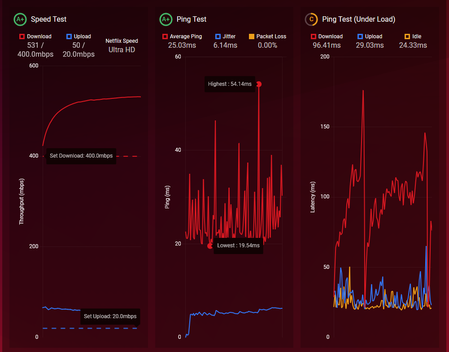
For some reason I am getting low speeds now, we pay for 500/20 and when the router isn't hooked up it works fine since I just tested it separately before and after. I haven't changed any hardware bet...
zeth07
Apr 11, 2025Aspirant
Firmware: xr1000v2 1.1.0.22_2.1.34
Modem: Netgear Nighthawk CM2000
Yes the app speedtest is showing the same speeds as Fast, but as shown the router itself is saying otherwise.
I've done a power cycle last night and today just trying to test it again and it didn't matter. Besides the fact that it worked fine when it was just the modem anyway when I tested it.
The ethernet cables I'm using are the ones that came with the product/s. I'm using the black one going from the modem to the router, and the yellow one is going from my router to the PC. The yellow one worked fine when it was just the modem to my pc. I guess I could test the black one again on its own but it doesn't really make sense for that to be a problem when the ROUTER SPEED TEST is showing the correct speeds.
I feel like I have done a factory reset after the firmware update because I was already having different problems before.

FURRYe38
Apr 11, 2025Guru - Experienced User
I would presume that the speed test point that the router uses may differ from what Fast.com or Ookla uses and maybe under some sort of busy status thus maybe giving some slower result. I would not put too much concern over this. If your getting to speed speeds with Fast and Ooklas then you should be good all around and be fine. I tend to pick results from speed test apps over onboard speed tests and these can differ over time. External test apps tend to be more accurate.
- zeth07Apr 11, 2025Aspirant
Maybe you misunderstood but the speeds on Fast and the app are completely wrong and way off from what I'm paying for which is the problem. The point being the speeds show up fine when it's just the modem connected but wrong when the router is connected when I haven't changed anything otherwise within any kind of expected time period for this to start happening.
- FURRYe38Apr 11, 2025Guru - Experienced User
Gotta cha, I mis read that. Sorry about that.
Something to try to help narrow this down. Connect a PC to the CM series modem. Power it OFF for 30 seconds then back ON. Test speeds.
- zeth07Apr 11, 2025Aspirant
As I already explained, I did in fact do that and the speeds were fine which is why I made the post here and said it must be a router problem...