NETGEAR is aware of a growing number of phone and online scams. To learn how to stay safe click here.
Forum Discussion

Rowns
Nov 25, 2023Tutor
XR1000 V2 NetDuma Firmware Not Updating/Showing Correctly
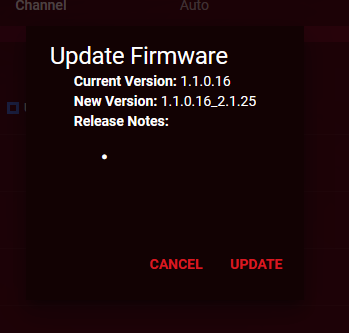
I recieved this router yesterday and I have already had to hard reset it to get my wired devices to appear under device manager. Now when I'm logged into the router via web browser on my PC, it c...
Rowns
Nov 25, 2023Tutor
Also no matter how I tweak the QOS settings, I keep getting massive underload ping spikes for downloads. Any suggestions on how to fix this?
- Netduma-FraserNov 26, 2023NetDuma PartnerYou're on the latest firmware so you can ignore that. Are you using Armor or connecting to the interface using HTTPS?
Have you got Congestion Control set to Always?- RownsNov 27, 2023TutorThanks for the response.
Armour is disabled as I have no intention of paying for it after the trial. And yes CC is set to always on.
How do I check the http/https
It just shows the ip/desktop, etc in the browser.- Netduma-FraserNov 28, 2023NetDuma PartnerWe're still improving the Connection Benchmark results so it's probable it's not as bad as it looks. Also if you have Congestion Control active at all that will eliminate bufferbloat so wouldn't be as bad as shown.
Use http://192.168.1.1 or http://routerlogin.net specifically to access
