NETGEAR is aware of a growing number of phone and online scams. To learn how to stay safe click here.
Forum Discussion

weedminer
Jan 25, 2021Aspirant
XR300 losing 50% of speed when bridging
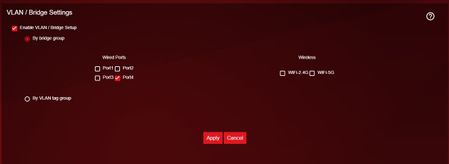
Hello, When I use the following option to get my IPTV working, the IPTV works perfectly, but the internet speeds are 40-50% worse. If I untick Enable VLAN Bridge Setup, it goes ba...
- Jan 26, 2021Check with Geo disabled and see if you have any connection issues - namely the ability to connect to players.
weedminer
Jan 26, 2021Aspirant
Both wired and wireless, it's the same.
I have removed Geo-filter, QoS, enabled disabled settings like UPNP, port scan and dos protection, nat-filtering, igmp proxying.
Nothing helped.
I also tried 3 different OS firmware versions and factory reset the router at least 3 times already.

Netduma-Fraser
Jan 26, 2021NetDuma Partner
Hey weedminer I remember we've discussed this on the Netduma forum, I doubt any NG staff will comment here but hopefully some other users may help, is your workaround still working?
- weedminerJan 26, 2021Aspirant
Hey Netduma-Fraser ,
It doesn't because it introduces a NAT type issue, from having the switch before everything.
I only posted here because I wanted Netgear staff involved.
Does it seem like this won't be solved, I am confused? I need to somehow make this work.
- Netduma-FraserJan 26, 2021NetDuma PartnerWhat NAT issue does it cause? NG staff don't comment here unfortunately, may be best if you create a ticket with NG and they may have some suggestions. http://support.netgear.com/
- weedminerJan 26, 2021Aspirant
I will, thanks!
Reminder - I put the internet cable in switch's port1, from 2 I put a cable in XR300 WAN and from 3 I put a cable in my IPTV box.
My PS4 is connected to XR300. When I test the connection on PS4, it says I can experience NAT issues and I am having issues connecting to the EA servers within FIFA 21.
Any ideas, Fraser :) ?