NETGEAR is aware of a growing number of phone and online scams. To learn how to stay safe click here.
Forum Discussion

Koz1614
Oct 09, 2023Tutor
XR500 - Wireless Devices showing up on LAN network
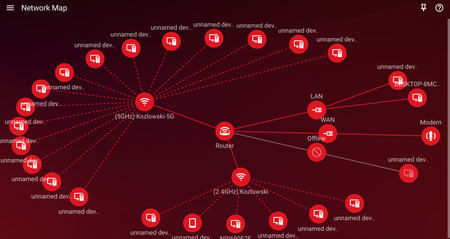
Hi, Can anyone assist me with this issue im having regarding wireless devices showing up on my LAN network? If I look at the network tree, I can watch different devices bounce back and forth...

Netduma-Fraser
Oct 09, 2023NetDuma Partner
The EX is the reason as the EX is connected to the router via ethernet and therefore technically thats what it sees the devices connected to the EX as, it can't tell they are connected to WiFi to another device as it doesn't control that device. It won't affect functionality in any way.
- Koz1614Oct 09, 2023Tutor
Hi,
I appreciate the reply. I am losing you where you say the EX is connected to the XR500 via ethernet. I have the EX setup to extend the 5ghz WIFI band from the XR500 and then from there it sends the 2.4ghz to the devices around the house. There is no hardwire connections involved. The only device hardwired to the XR500 is a desktop computer.
- Netduma-FraserOct 09, 2023NetDuma PartnerUnderstood, the same theory applies though, the XR can't tell how devices are connected to another device, in this case the EX so it defaults to showing a LAN connection.
- plemansOct 09, 2023Guru - Experienced User
Why do you have the 5ghz disabled on the extender?
The whole purpose of the tribands is the dedicated backhaul between router/extender and then using the 5ghz on the extender for high throughput.
- Koz1614Oct 09, 2023Tutor
The location I have the router and extender placed, the 5ghz is not powerful enough to reach certain areas of my home. What would be your recommended setup? Also any thoughts on the wireless connections showing on LAN? Im seeing so many unnamed devices as well which is frustrating.
