NETGEAR is aware of a growing number of phone and online scams. To learn how to stay safe click here.
Forum Discussion

Kemtach2999
Apr 01, 2019Aspirant
XR500 & EX2700 compatability issue
Hi all,
I consider myself quite tech savvy, but this is beyond me.
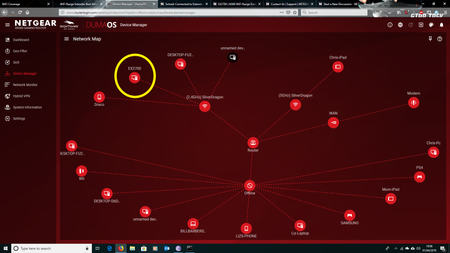
The backstory: I have recently moved house and I am currently trying to set up a small office in the spare room of t...

FURRYe38
Apr 01, 2019Guru - Experienced User
Does the printer show up if directly connected to the XR router?
The EX is an older model extender. Possible some incompatibility with new XR Wifi and connections.
Is Smart connect enabled on the XR router?
 Kemtach2999Apr 02, 2019Aspirant
Hi,
Thank you both for your replies.
At the moment the printer is not showing up when directly connected to the router - despite the network port showing signs of activity. (steady green light, flashing amber light)
I've checked DumaOS and yes, smart connect is enabled.
With regard to the offline PC - somehow over night it has resolved itself and now shows under the correct address on DumaOS
As for the printer it is under a static IP address which is different to the IP addresses asigned by the router - HP address is 192.168.1.132 - all current IP addresses are 10.0.0.x
- schumakuApr 02, 2019Guru - Experienced User
Kemtach2999 wrote:
As for the printer it is under a static IP address which is different to the IP addresses asigned by the router - HP address is 192.168.1.132 - all current IP addresses are 10.0.0.x
So this is the only issue remaining when I get it right.
First think about why the XR500 has changed to the 10.0.0.x/24 network - this does happen typically under double NAT situations where e.g. a provider router does NAT and use the 192.168.1.x/24 network. Some of these (but less and less) can be re-configured to modem or transparent modes. If this is not feasible, change the HP config to DHCP, make a reservation for its IP-MAC pair on the router, and then you might consider changing it to that very same fixed IP.
- Kemtach2999Apr 08, 2019Aspirant
Hi,
Just wanted to say thanks for all the information.
I've been a little busy at work so haven't had time to try out your suggestions or reply - Sorry about that.
I have a little free time today so will review everything and see if I can get to the bottom of it all.
The big changes to this network and the old one (where the printer worked ok) that I can see is that I'm now using a Virgin cable modem connected to the XR500 and as mentioned before the EX2700 extender to get decent signal in the office room.
I'll try and get more screen shots up of as much relevant information as I can, as I have a feeling I'm not explaining this very well
Again though, thank you so much for the time and information you're providing. It's very much appreciated.
