NETGEAR is aware of a growing number of phone and online scams. To learn how to stay safe click here.
Forum Discussion

Kemtach2999
Apr 01, 2019Aspirant
XR500 & EX2700 compatability issue
Hi all,
I consider myself quite tech savvy, but this is beyond me.
The backstory: I have recently moved house and I am currently trying to set up a small office in the spare room of t...

schumaku
Apr 01, 2019Guru - Experienced User
Kemtach2999 wrote:
Issue 1 - limited wifi in said room - The router is connected in the living room downstairs, and the office is in the top room at the back of the house (Virgin router didn't reach and apparently the XR500 doesn't quite make it either. Solution Range Extender
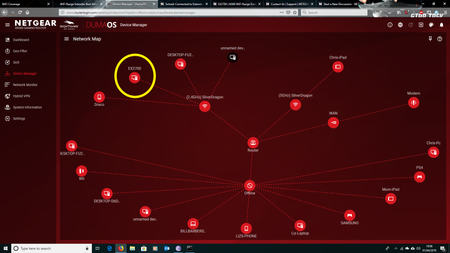
Now in terms of accessing the Internet though the Extender I'm having no real issue (I'm connected using the extender right now) however DumaOS is showing this PC as offline ( I have completed the Netgear steps to assign one SSID to both the XR500 and N300 extender).
The "offline" PC does it show up under it's real MAC address where it was used to connect before, or the virtual MAC - as the older extenders are doing MAC translation - which is different from the effective MAC ... so I guess the DumaOS does make two devices out of it (just like any other router or the "classic" Nighthawks before).
Kemtach2999 wrote:
Should the N300 be communicating with the XR500 (thus showing devices connected through it as online in DumaOS) If so, how do I get Duma to recognize those devices (currently this PC and the Printer)
Using IP Config to ping the address of the N300 returns a 0% loss rate, however pinging the address of the printer returns a 100% loss rate, implying that the printer isn't connected to the network
Either case, it's just L2 communication - if the PC can talk to the Internet it must be visible somehow and somewhere on the DumaOS network map, under a different MAC address (see the connected devices list on the EX2700) for the "Virtual MAC".
Similar for the printer - there is a MAC address translation - we can assume it does show up in the EX2700 connected device list (with real MAC, with Virtual MAC, and even it's IP address) - please check this.
When you say ping the printer IP - is this an IP address assigned by DHCP from the router, or was the printer configured to a static (fixed) IP address?
If it's a static IP config, is the IP address/mask/gateway in the same subnet like the XR500 LAN subnet and the connected system from where you run the test?