NETGEAR is aware of a growing number of phone and online scams. To learn how to stay safe click here.
Forum Discussion

TokeZen
Feb 06, 2019Aspirant
XR500 blocking my Upload tests?
Hey guys,
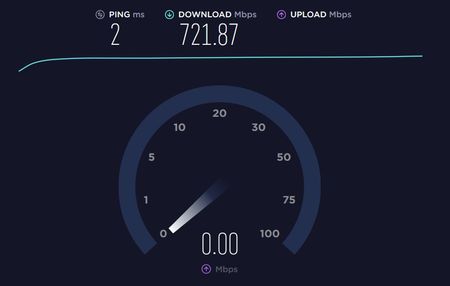
I got this router few days ago and had a go at it. Loving it so far, fixed most of my networking issues I had with previous router I used.
However, I couldnt test my upload speed at spe...
- Feb 07, 2019
If other devices work and this one particular PC doesn't, I would try different browser, disable all security software and browser plug-ins temporarily. Ensure your network adapter is set for Auto Obtain IP addressing.
Install speedtest.net testing app instead of using a browser.

FURRYe38
Feb 07, 2019Guru - Experienced User
If other devices work and this one particular PC doesn't, I would try different browser, disable all security software and browser plug-ins temporarily. Ensure your network adapter is set for Auto Obtain IP addressing.
Install speedtest.net testing app instead of using a browser.
Netduma_Jack
Feb 07, 2019NetDuma Partner
Good job in isolating where the fault is. Now we know it's the PC, it's probably do with firewall or security software on your computer. It's seeing you're about to upload a shed load of data and is stopping it to be cautious.
Try Furry's suggestions and let us know if you manage to get to the bottom of it.