NETGEAR is aware of a growing number of phone and online scams. To learn how to stay safe click here.
Forum Discussion

Xr500
Dec 21, 2018Apprentice
XR500 RAM BUG
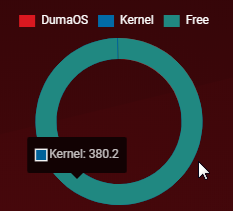
On December 13, I updated the latest firmware. So far, I haven't shut down my router. RAM is abnormal.
Cable connection is normal, WiFi is slow.
KirillRus
Dec 25, 2018Initiate
Good afternoon. After the last update, I have decreased the speed of the inernet. What a cable that Wi fi. I called the provider. They tested the speed of the equipment. Then I tested my Internet cable and it turned out that as soon as I updated to a new update. According to them, I stopped calling on the Internet cable 2-6 lived. I switched on the uabel on a straight line bypassing the router, all the conductors are ringing. Including the cable in the WAN port, two wires do not ring. Said that the problem is in the router as bypassing it all lived called. As soon as I updated. The provider himself called me and reported the problem. The port itself was not burning no smell. This is exactly the fault of the new. I have an internet speed of 1000/1000. Now a maximum of 400/800. I use cabaret 7 categories.

FURRYe38
Dec 26, 2018Guru - Experienced User
I would contact NG support about this. Ask about a RMA.
I get 900Mb with my XR450 which is normal for 1Gb services.
KirillRus wrote:
Good afternoon. After the last update, I have decreased the speed of the inernet. What a cable that Wi fi. I called the provider. They tested the speed of the equipment. Then I tested my Internet cable and it turned out that as soon as I updated to a new update. According to them, I stopped calling on the Internet cable 2-6 lived. I switched on the uabel on a straight line bypassing the router, all the conductors are ringing. Including the cable in the WAN port, two wires do not ring. Said that the problem is in the router as bypassing it all lived called. As soon as I updated. The provider himself called me and reported the problem. The port itself was not burning no smell. This is exactly the fault of the new. I have an internet speed of 1000/1000. Now a maximum of 400/800. I use cabaret 7 categories.
- Netduma-FraserDec 29, 2018NetDuma PartnerThanks for picking that up, I've only seen it once before. Is it fine after a reboot?
Kirill, make sure your speeds are entered correctly in Anti-Bufferbloat Settings and then disable the QoS entirely in that same menu. Then do a wired speed test from the PC.

