NETGEAR is aware of a growing number of phone and online scams. To learn how to stay safe click here.
Forum Discussion

WacoJohn
Apr 05, 2025Luminary
XR500 Readyshare W11 Home
Works perfectly on 2 W10 Pro laptops. Not so on 1 W11 Home, Sorry to say I don't remember if it ever worked on W11 machine or not. Years ago .. b4 W11, Gearhead gave me some instructions which ha...
- Apr 12, 2025
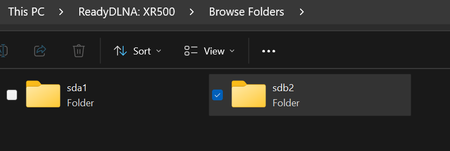
First of all, it (W10 Pro) is working perfectly!!!!!!!!! I can't be sure exactly what was wrong or what fixed it. I did a sfc and Dism routine and it would not complete. Rebooted machine. Did an elevated Disk Cleanup. It would not complete. Did a CCLEANER PRO routine which completed. Rebooted machine. Dism/sfc again. They completed. Disk Cleanup again and it completed. Rebooted machine and it came up just right. Problem solved. Now have mapped M: and N: readyshare drives in Explorer. Backing that up now then on to W11 Pro. I expect it to work. Will see soon. 😀
Of course thank you Sir .... for everything. Will come back to mark SOLVED once I see W11 Pro on that machine.

FURRYe38
Apr 12, 2025Guru - Experienced User
Only other thing I didn't put in that PDF was enablement of SMBv1 Client which is enabled as well:
Ya, i've kept SMB v1 Client enabled on my PC for years. Haven't seen any issues with it to date.
WacoJohn
Apr 12, 2025Luminary
First of all, it (W10 Pro) is working perfectly!!!!!!!!! I can't be sure exactly what was wrong or what fixed it. I did a sfc and Dism routine and it would not complete. Rebooted machine. Did an elevated Disk Cleanup. It would not complete. Did a CCLEANER PRO routine which completed. Rebooted machine. Dism/sfc again. They completed. Disk Cleanup again and it completed. Rebooted machine and it came up just right. Problem solved. Now have mapped M: and N: readyshare drives in Explorer. Backing that up now then on to W11 Pro. I expect it to work. Will see soon. 😀
Of course thank you Sir .... for everything. Will come back to mark SOLVED once I see W11 Pro on that machine.