NETGEAR is aware of a growing number of phone and online scams. To learn how to stay safe click here.
Forum Discussion

CydTulkas
Dec 04, 2020Aspirant
xr700 cannot find Internet through SFP+ port
Hi all, I have recently purchased an XR700 router in the hope of being able to switch the router from the provider. According to my provider I am allowed to use my own router as long as I can con...
DOGGAVELI
Dec 04, 2020Star
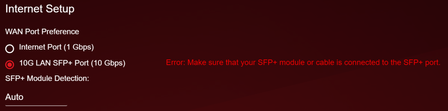
CydTulkasIn your XR700 internet settings you need to enable "DAC" mode. By default its on auto so select the drop down box and select DAC and apply settings. You will then see that the 10G light will start and flash once you have done this.
Then select Monitoring from the options then Statistics and you will see the 10G connection transmitting data and then all your setup and good to go mate.
Kind Regards,
Dogga.
- DOGGAVELIDec 04, 2020Star
CydTulkasthe below info is what helped someone else with the same problem.
The XR700 should automatically pick up the 10gb connection, the only thing we had to change for it to be noticed and work if by the following steps.
1. In XR700 got into internet settings;
2. Under "SFP+ Module Dection": Change that from auto to "DAC mode only"
3. Now the 10gb light should be on the XR700 providing you have a AXM765 Transceiver pluged into the 10Gb port.
Link: https://www.netgear.com/business/products/switches/modules-accessories/axm765.aspx
Once Done
Got into Monitoring in the XR700, then statistics and you should see data flowing in the SFP+ section
See attached photo for your records hope this helps u mate.
Kind Regards,
Dogga