NETGEAR is aware of a growing number of phone and online scams. To learn how to stay safe click here.
Forum Discussion

strykewave
Jan 30, 2019Guide
XR700 SFP+ problems.
Hi, I have an XR700 Nighthawk router and an SX10 progaming switch. My PC has an Aqtion aqc 107 10g lan port. Ive Rma'd the netgear axm765 in hopes that it was the problem got a new one plugged it in the module did not work. It wouldnt show lights on the either the switch nor the 10g lan port on the mobo and locked up the router, not even the wifi would work. After Rma the same issue persisted. Rma'd the xr700 just plugged it in the lights come on on both the the 10g lan port on the mobo and the switch but no internet and no network detected the light for the 10g lan port on the router is not lit up. The statistic light says link down but the lights are lighting up. I have spent 2 weeks with Netgear support trying to solve this and I am puzzled, Im hoping someone has had the same problem and knows the solution for this. Any help will be great ful and thanks in advance.
Zack.
Hi Strykewave in regards to the 10GB connection my friend and I both have an Xr700 and we had lots trouble getting it to work.
The XR700 should automatically pick up the 10gb connection, the only thing we had to change for it to be noticed and work if by the following steps.
1. In XR700 got into internet settings;
2. Under "SFP+ Module Dection": Change that from auto to "DAC mode only"
3. Now the 10gb light should be on the XR700 providing you have a AXM765 Transceiver pluged into the 10Gb port.
Link: https://www.netgear.com/business/products/switches/modules-accessories/axm765.aspx
Once Done
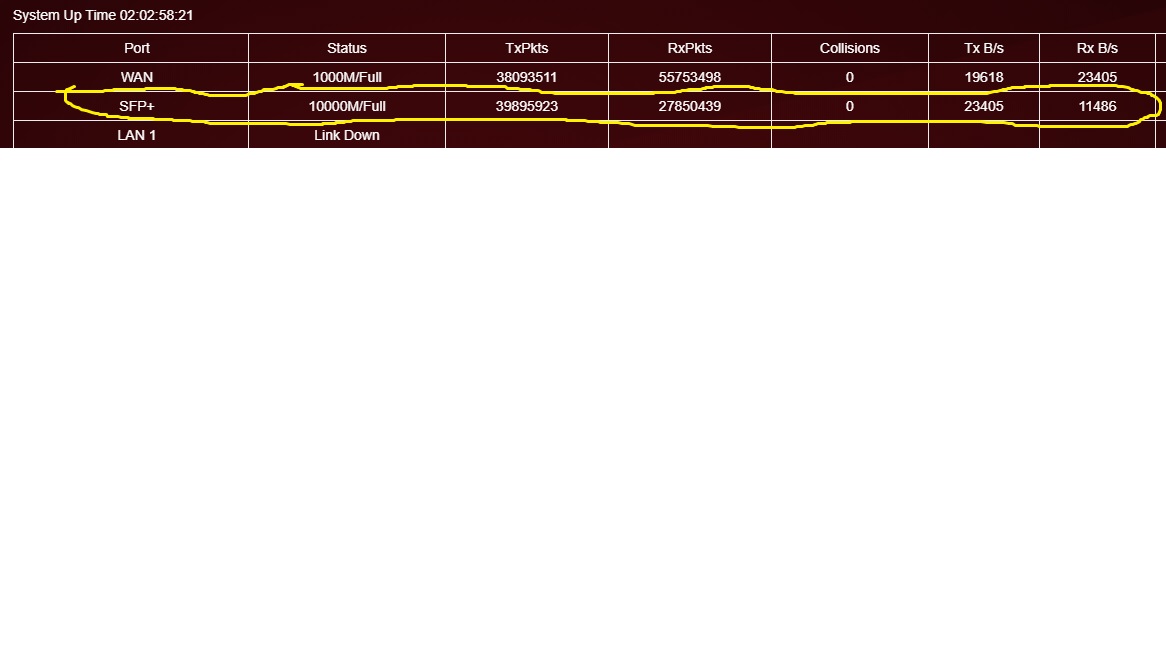
Got into Monitoring in the XR700, then statistics and you should see data flowing in the SFP+ section
See attached photo for your records hope this helps u mate.
Kind Regards,
Dogga
strykewave wrote:
Selected games console under traffic prioritization and the red light came on. Although its pc i dont care as long as it works. Now on the the 10g issue.
13 Replies
- Netduma-FraserNetDuma PartnerHave you changed in Settings to use that port properly? I believe it's in Internet Setup
Yes I have tried to change the 10g sfp+ setting it does not detect the axm765 plugged in. That is a wan setting. I am going from the cm1000 to the netgear xr700 yellow port from the 10gsfp+ port with axm765 to nighthawk 10g switch from the 10g switch to my 10g nic on my computer. I have tried hooking straight to the computer as well. Still not detected although the data lights light up on the switch and the computer. The light on the 10g setting for the router does not light up.
- Netduma-FraserNetDuma PartnerThe settings/hardware are not my strong point as we focus on the DumaOS side. So I would usually recommend you contact Netgear support but doesn't sound like you've had much luck.
Have you done a factory reset and then set up from scratch once you've gone through the Setup Wizard?