NETGEAR is aware of a growing number of phone and online scams. To learn how to stay safe click here.
Forum Discussion

claudiut
Dec 07, 2021Apprentice
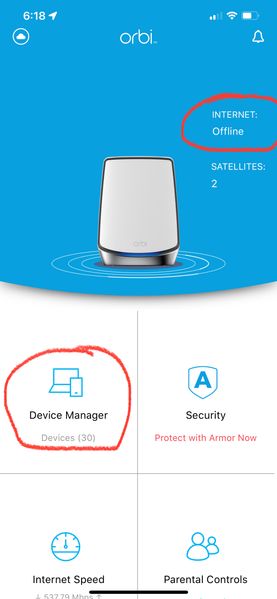
Device Manager error CDIL-API-FAIL (RBR750)
I've recently updated to the latest firmware for my RBR750 system and since the Orbi app (iOS 15) has a few issues: 1. Every time I tap on Device Manager I'm getting an error "CDIL-API-FAIL" erro...
- Jul 06, 2022
This issue CDIL-API-FAIL (RBR750) on my router is fixed. I had a call with customer care(may be technical) for an hour long.
He helped me upgrade the firmwares of my Router and Satellites to RBR750-V4.6.8.5 and RBS750-V4.6.8.5.
After upgrading the firmwares and doing a factory reset the issue is resolved. Now I am able to access Device Manager and could Pause/Resume the devices.
madhu3110
Jul 06, 2022Aspirant
This issue CDIL-API-FAIL (RBR750) on my router is fixed. I had a call with customer care(may be technical) for an hour long.
He helped me upgrade the firmwares of my Router and Satellites to RBR750-V4.6.8.5 and RBS750-V4.6.8.5.
After upgrading the firmwares and doing a factory reset the issue is resolved. Now I am able to access Device Manager and could Pause/Resume the devices.

FURRYe38
Jul 08, 2022Guru - Experienced User
Glad you got it working. Be sure to save off a back up configuration to file for safe keeping. Saves time if a reset is needed.
https://kb.netgear.com/000062080/How-do-I-back-up-the-configuration-settings-on-my-Orbi-WiFi-System
Enjoy. 📡
madhu3110 wrote:
This issue CDIL-API-FAIL (RBR750) on my router is fixed. I had a call with customer care(may be technical) for an hour long.
He helped me upgrade the firmwares of my Router and Satellites to RBR750-V4.6.8.5 and RBS750-V4.6.8.5.
After upgrading the firmwares and doing a factory reset the issue is resolved. Now I am able to access Device Manager and could Pause/Resume the devices.
- BadasscigarlifeJul 15, 2022Aspirant
Did the firmware updates and reset the router, and it works for awhile. Then after a couple of days router requires a reboot. This problem has existed in all of your products going back several years and a reboot is the only thing that fixes things. Which is not acceptable for a MESH Network, I have 3 Satellites and reboots cause havoc on the entire network.