NETGEAR is aware of a growing number of phone and online scams. To learn how to stay safe click here.
Forum Discussion

DogServant
Feb 16, 2021Initiate
How do I change router name in Orbi app's "Your Products"
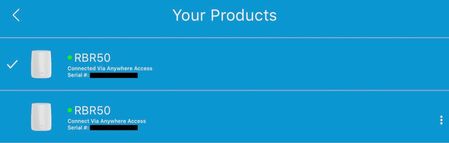
I administer 2 Orbi routers at different locations using the Orbi app on iOS devices. In the Orbi app I have updated the router names under "Router Settings" but under "Your Products" they both show...

CrimpOn
Feb 16, 2021Guru - Experienced User
Can you make a screen shot of the page in the Orbi "app" where the device can be edited?
This page of the app is differenct from the Orbi web interface Attached Devices which allows users to 'name' satellites and devices.
DogServant
Feb 16, 2021Initiate
CrimpOn wrote:Can you make a screen shot of the page in the Orbi "app" where the device can be edited?
This page of the app is differenct from the Orbi web interface Attached Devices which allows users to 'name' satellites and devices.
The router name can be changed in the Orbi app, but unfortunately that name is not displayed in the Products list.
1) Select your router, then 'SETTINGS'
2) Select 'Router Settings'
3). In 'Router Settings' select 'Router Name' and a popup will let you change the router's name.
- FURRYe38Feb 16, 2021Guru - Experienced User
This works. Confirmed.
DogServant wrote:
CrimpOn wrote:Can you make a screen shot of the page in the Orbi "app" where the device can be edited?
This page of the app is differenct from the Orbi web interface Attached Devices which allows users to 'name' satellites and devices.
The router name can be changed in the Orbi app, but unfortunately that name is not displayed in the Products list.
1) Select your router, then 'SETTINGS'
2) Select 'Router Settings'
3). In 'Router Settings' select 'Router Name' and a popup will let you change the router's name.
 vajimFeb 17, 2021Master
Lots of problems with the app AND there is a separate forum for the app
