NETGEAR is aware of a growing number of phone and online scams. To learn how to stay safe click here.
Forum Discussion

awawaw
Sep 19, 2020Guide
iOS 14
After upating my iphone to iOS 14, I cannot log into the Orbi application via local access. I can still access via remote access. Please help.
- Sep 29, 2020
Update 29 September 2020.
Orbi has released a new update 2.6.4.13 and my problem has been solved. It is working now. Thank you everybody.
ChrisKing
Oct 04, 2020Apprentice
Sadly the new version of the app has not worked for me on iOS 14.0.1.
I was not aware of the issue until I stumbled over it on the community and thought it was my wifi problem.
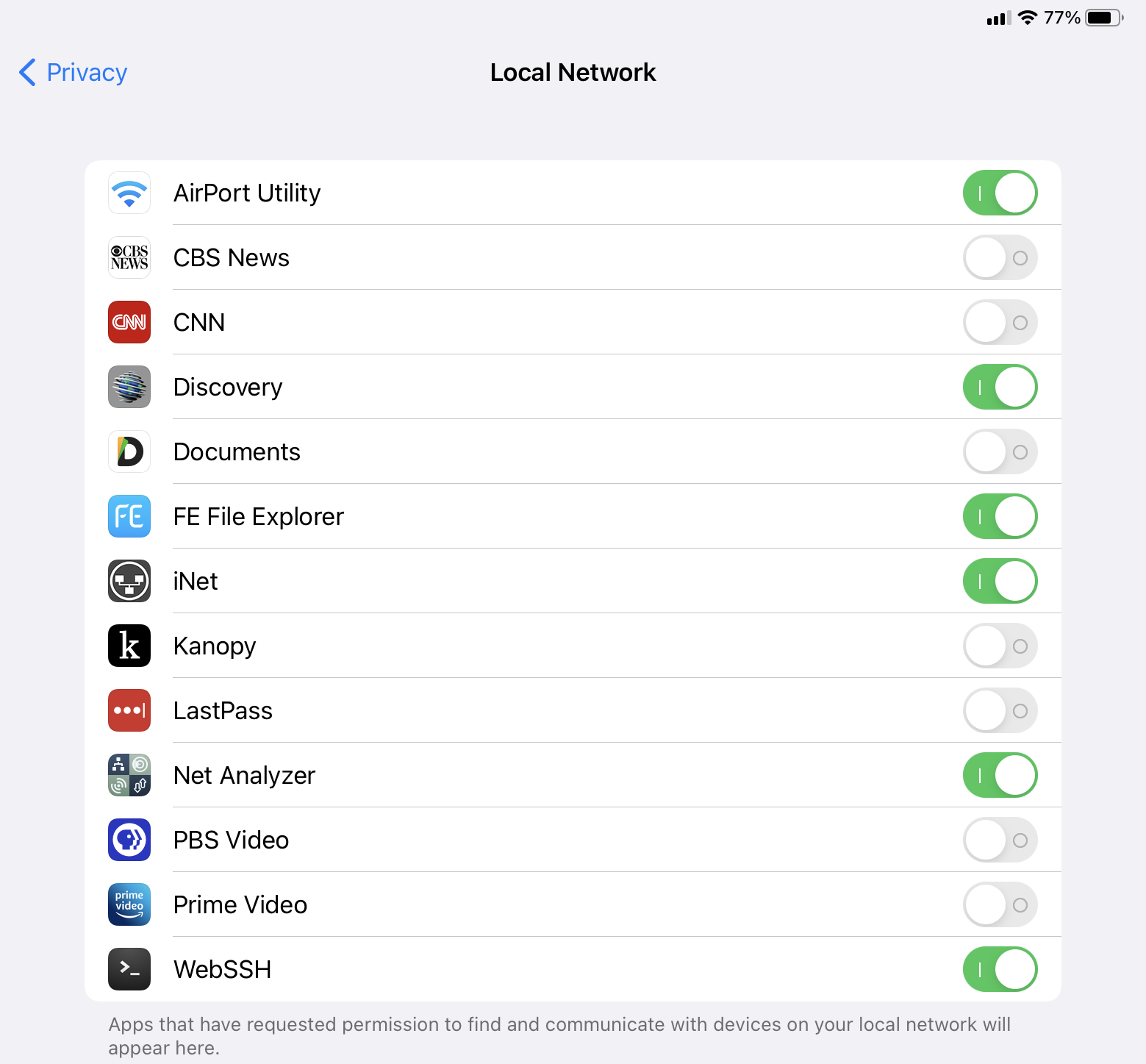
I have deleted the app (and settings), downloaded the new version as per an earlier user, but when I go to the Orbi App Settings, there is no option for Local Network, and under Privacy, Orbi is not listed inside the Local Network settings.
I can still connect via Anywhere Access, and through my browsers etc, so all other functionalty including Wifi is working fine. So the bug is in the App itself.
I also emailed Christian as per his message to other users explaining this problem, hopefully a new version with the bug fix can be deployed soon.
Chris

Christian_R
Oct 09, 2020NETGEAR Employee Retired
Hello Community Users,
Our engineering team is aware and currently investigating. I'll provide updates to the issue as soon as they become available.
Thank you,
Christian
- awawawOct 11, 2020Guide
We are sorry to report that my "resvolved" problem came back. It was "resolved" but the exact same problem is now happening again. Only my new iphone (paired with Apple watch) cannot log in locally. All other older iphones, ipad and Andriod work cell phone are able to log in locally. I understand that Orbi (Netgear) is working on a solution for others and we hope it will also help me again. Thank you all and I will update you guys if there is a solution. Thank you all
- evntwizOct 11, 2020Aspirant
not connecting here at all cant get trusted device and basically dead in water unless i use my desktop.
rbr20
3 sattelites
latest app version
latest firmware version
all crap
- ChrisKingOct 12, 2020Apprentice
New app released today by Netgear
Works for me now and 100% successful :)
 Stev3DOct 12, 2020Luminary
I got it this morning, and can confirm it works.
But, I discovered something very disturbing. When exploring the new user interface, I tapped "Anywhere Access" and discovered that it says it was turned on! I never, EVER enabled remote (WAN side) management -- there's not an chance in the world.
Enabling remote (WAN side) management is a terrible idea from a security perspective, and killing that -- and UPoP -- are among the first things I check with any new device (or when I help out others).
And yet the app says it was on. I know that it was not on a few weeks ago when I viewed my Orbi from the Web interface -- so how was it turned on? Not by me!
Does this new iOS app enable it automatically? If so, there needs to be a big red warning label.
I suggest everyone check theirs to be sure something isn't enabled without your knowledge.
- schumakuOct 12, 2020Guru - Experienced User
Stev3D wrote:Enabling remote (WAN side) management is a terrible idea from a security perspective, and killing that -- and UPoP -- are among the first things I check with any new device (or when I help out others).
Well, not so terrible as the UPnP-PMP panicked always want to see: It's not WAN side management - there are no ports opened and exposed - it's not Remote Access. Much more, the router does establish a link to Netgear's cloud from where only the authenticated can make use of Anywhere Access connecting back to your router.
No idea what might have enabled it - but then it was (and probably still is) the second chance for iOS 14 users not aware having to enable the Local Network Permission and/or users having enabled MAC based access control on their Netgear devices where the other brilliant Apple tin hat default named Private WiFi address (read a random MAC is used on every new connection) - unless disabled for the network - does definitively close the door. The amount of posts here and on many other communities and support channels is exploding due to this overrated new security features - which are above the understanding for the average user base.
- schumakuOct 12, 2020Guru - Experienced User
Stev3D wrote:And yet the app says it was on. I know that it was not on a few weeks ago when I viewed my Orbi from the Web interface -- so how was it turned on? Not by me!
Here again. Two complete different things.
Originally Netgear used the terms "Remote Access" for the exposed port/service (this is what we can control from the Web UI), and "Remote Management" for the cloud based access, later they made a mess out of it and used the same "Remote Access" designation. The new name for the cloud based access was changed to "Anywhere Access" - which was and is only controllable from the App.
- Stev3DOct 12, 2020Luminary
schumaku , I appreciate the explanation of the difference between Anywhere Access and Remote Management (I just assumed Anywhere Access was NETGEAR's fancy brand name for remote management -- not unlike Apple's "Private [Wi-Fi] Addresses" label you dis). And while I still don't want the WAN-side tunnel to NETGEAR's cloud, but it isn't the "hair on fire" issue I thought it was.
I am a fan of the random MAC address feature that Apple rolled out (great tracking prevention), but it does mean that Netgear (and other manufacturers) need to alert users who use MAC addresses for admission control and IP address assignments that they must have people turn off Private [Wi-Fi] Addressing for the SSIDs they manage.
Security is never easy, but in-security is -- you get what you pay for.
- schumakuOct 12, 2020Guru - Experienced User
Stev3D wrote:I am a fan of the random MAC address feature that Apple rolled out (great tracking prevention), but it does mean that Netgear (and other manufacturers) need to alert users who use MAC addresses for admission control and IP address assignments that they must have people turn off Private [Wi-Fi] Addressing for the SSIDs they manage.
Nope - fully disagree! There are many valid reasons why admins configure MAC address for admission control - a huge effort by the way.
It makes absolute no sense to enable this random MAC on your private home or business network. Nobody is tracking you on your own home or business network my friend - much more it does break standard security and network management. We've started to capture devices coming to our managed network infrastructure with local MAC and put them up to a dedicated VLAN where they get information on how to disable this mess. A unique ID - like the device MAC - is required for monitoring and auditing reasons in business environments btw.
As IT security operations, as the owner of the network, as the owner of the business, we have the right to see the unique MAC assigned to the device, regardless if this is a business owned or BYOD.
And there is no reason why network admins should disable the MAC based access lists.
- schumakuOct 12, 2020Guru - Experienced User
Stev3D wrote:Security is never easy, but in-security is -- you get what you pay for.
That's exactly why disabling the MAC access control isn't an opiton.
My network, my responsability: Access only with the real Wireless Adapter MAC. Any CIO, any IT security person, any IT auditor will agree.
Your network - your rules. I don't care.
And telling the admins to disable the MAC access control can't be the solution.
- Stev3DOct 12, 2020Luminary
schumaku , you either mis-read or misunderstood what I wrote.
You wrote, "There are many valid reasons why admins configure MAC address for admission control - a huge effort by the way."
That was my point; I use MAC address filtering / admission control on all my networks because I want to know (and I do track) and control what devices are there. MAC Address filtering is not fool-proof (because addresses can be spoofed), but that does add an extra bit of complexity for intruders. So anyone using my network is required to disable it -- just like you do.
I am a fan of what Apple has done, even if it makes for extra work for me, because so many people are suckers for "free" Wi-Fi and the like. Sure it's a bit more work for us, but it does serve the greater good. People who understand networks can do the work, people who are clueless need our help and support -- because the jackals that are the information brokers are taking advantage of their naivety.
And I wrote, "but it does mean that Netgear (and other manufacturers) need to alert users who use MAC addresses for admission control and IP address assignments that they must have people turn off Private [Wi-Fi] Addressing for the SSIDs they manage."
In other words, people like us (and organizations like Netgear) need to tell users to turn off "Private Addressing" for the SSIDs we manage. I did not write that we need to turn off MAC Address filtering on our networks. But I see that my wording may have been less than 100% clear.
So, I think we are in "violent agreement" that Private Addresses are not needed on managed networks, but we do seem to differ as to whether it is a good thing in general or not (I think Apple has done the world a service, even if it adds to complexity on properly managed networks).
Peace.
- Stev3DOct 12, 2020Luminary
Post-posting proof reading: When I wrote "So anyone using my network is required to disable it -- just like you do" the "it" here was Private Addressing (I should avoid the use of pronouns).
- schumakuOct 12, 2020Guru - Experienced User
Peace <3
- awawawOct 12, 2020Guide
We would like to report that after the update 2.6.5.1 , our issue has been resolved (again). Thanks.
I saw a whole bunch of discussion on "Access Anywhere". Should I turn that off for added security?
I also saw some discussion on MAC address filter. I was told it is not useful as the bad guys can clone MAC address and gain access. Is this another added security which I should turn on? It will be a lot of work as we have some many items on the network.
I know nothing about PUP ...... Thanks.
- schumakuOct 12, 2020Guru - Experienced User
Don't take me wrong: There is nothing wrong with the offering random MAC addresses for WiFi connections..
Not acceptable was the iOS 14 (and iPadOS 14, WatchOS 7) forced this on by default on all known connections. Instead, they should have asked the user - while connecting to an SSID for the first time following the update - if the feature should be enabled for this network. And not let people alone and often offline without their home WiFi Internet connection...
Not acceptable again was the iOS 14 introduction of the new Local Network Permission. For not yet updated and legacy Apps, they should have asked on launching the App for the first time (in the forgrund or as a background service) that it appears that the App does require LAN access, and allow to grant the permission if required. And not leave users out there alone with non-workable Apps.
Simply a bad job by Apple. And how they were praised for this - at lest before iOS 14 was rolled out widely. Gee, I was starting to love em ....
Alphabet did it much better with Android 10 rolled out following a very long test period some weeks before iOS 14 First, they listened to us IT professionals and not to the generation tin hat! Existing WiFi connections configured had not been reconfigured for enforcing the randomized MAC. Permissions of long-time non-used Apps will be removed, being for the new A10 permission system or the legacy permission scheme. When open the Apps later again, the user is queried to allow the permissions required by the App again.
- schumakuOct 12, 2020Guru - Experienced User
awawaw wrote:I saw a whole bunch of discussion on "Access Anywhere". Should I turn that off for added security?
It's not just about added security. If you intend to use Anywhere Access enable it. Disable features you have no need.
awawaw wrote:I also saw some discussion on MAC address filter. I was told it is not useful as the bad guys can clone MAC address and gain access. Is this another added security which I should turn on? It will be a lot of work as we have some many items on the network.
Some admins are still building on it, some security guidelines and policies still require a managed MAC access list. Undoubted, it does add a certain level of security. As a security person and pentester, I am happy to be a bad guy looking for apparently valid MACs and stying tuned 'till I can jump on the net ... Lot of effort for the management, indeed. Even more effort in the case where some key systems/devices used for the network break down, burned down, or are stolen 8-)
- Stev3DOct 12, 2020Luminary
awawaw , you asked:
> Should I turn that [Access Anywhere] off for added security?
If you have no need or desire to manage your network from outside (away from home or office), then yes. The general principle is to turn off access features you don't use. What I learned today sounds like Netgear has done a nice job of safely enabling it (but if you don't need the convenience, it is better to lock the door).
Regarding MAC filtering (access control), it should never be realied upon as a first line of defense, and it is surmountable by a determined adversary. But it is "one more damn thing" that an intruder has to deal with, so from the principle of defense in depth, it can help. It will, for example, prevent a teenager or employee from giving access to your home network to their friends. But it does require additional effort (e.g., to keep track of MAC addresses), so for some situations the benefit isn't worth the effort. You have to decide for yourself (I'm "into" networking and security, so for me it is worth the effort).
UPnP ("Universar Plug-and-Play") was a disaster from the start. It allows any device on the LAN to open up ports on the WAN side. It was envisioned as a convenience, and is based on the notion that you can trust any device on the inside (your LAN) to be benign (because, what could possibly go wrong <grin>). Of course, any computer, tablet, or mobile phone on the LAN can visit the the wrong Web page which can initiate a JavaScript that then can "conveniently" open ports that the bad guy wants to open. Or be infected with malware that let's in additional invaders. I don't know if Netgear still turns UPnP on by default or not (they used to), but from the Web interface for your Netgear product, go to Advanced / Advanced Setup / UPnP and uncheck the "Turn UPnP On" checkbox if it is checked.
- schumakuOct 12, 2020Guru - Experienced User
Two additions:
The thing we talk about is UPnP-PMP (Port mapping protocol) - there are many other features part of the UPnP specs, unrelated to port forwarding. UPnP SSDP is the de-facto standard for discovering printers, scanners, NAS, and many other network devices on a LAN for example.
Gaming devices, game programmers, gamers and gamers operating their own gaming hosts are still heavily depending on port forwarding, conveniently handled by UPnP-PMP for many, and manual port forwarding for a few. And the predictable disaster and finger pointing what happens if two or more play the same game on the local network, requiring the same ports forwarded, ...
- awawawOct 12, 2020Guide
Thank you. I followed your advice and turned off the UPnP which was on. I did not even remember how to log on with a web page anymore. :) Thank you everyone.
- awawawOct 14, 2020Guide
Well, my exact problem came back again for the 3rd time. It is like a daily repeating cycle.
Yes, the iphone with the Apple watch cannot access Orbi locally. All other older iphones, ipad and Andriod phone have no problems. We are not sure if it is related to the Apple watch update OS 7.0.2 which came out last night. Is so, perhaps a fundemental change of the Orbi software somehow will be required. Thank you all.
- schumakuOct 14, 2020Guru - Experienced User
awawaw wrote:Yes, the iphone with the Apple watch cannot access Orbi locally.
== can't access Orbi using the Orbi App in local mode, while Anywhere Access is fine?
Both the iOS 14 iPhone and the associated WatchOS 7.0.2 have Private Address disabled on the Orbi SSID they are using? -> https://support.apple.com/en-us/HT211227
Can access for example your local router in a browser like Safari from the iPhone and the watch?
- schumakuOct 14, 2020Guru - Experienced User
...and the iOS system has granted the Local Network Permission for the Orbi App on your network/SSID?
- awawawOct 14, 2020Guide
That is something new but it still does not work. I turned off the private address option for both the iphone and Apple watch and it is still not working. I also rebooted both just to be safe. It did not help.
Please note all my other older iphones have the private address option turned on and they do not have any problems accessing Orbi locally. Also, Orbi did not ask me to turn the private address off during the back and forth support in this community thread. The only thing I can think of is the fact that the phone has been paired with an Apple watch.
I had similiar problems with Wemo. I was not able to add new smart switches. However, by chance, I tried with the older iphone or ipad and they were able to add the new smart switches instantly. At the time, Wemo kind of gave up helping me since I was able to add the switches. From then on, I simply do not use my iphone (paired with Apple watch) to add new smart switches. Thanks.
- Stev3DOct 14, 2020Luminary
Two days ago in this thread, I reported:
"I got it [the Orbi app update] this morning, and can confirm it works."
Last night I attempted to use it again, and it failed, reporting that it cannot connect to my Orbi (the authentication issue was solved, and remained so). When I checked Settings / Privacy / Local Network, the Orbi app wasn't even listed (aside: Netgear's genie and Nighthawk apps are there, not Orbi!). When I went to the Orbi app settings, the Local Network item is completely missing.
I have deleted and reinstalled the app -- makes no difference. It's as if a piece of the app is missing (the piece that asks for local network access).
Any suggestions (besides uninstalling it and then hard rebooting the phone -- which is my next step)?
- schumakuOct 14, 2020Guru - Experienced User
Stev3D If the user has declined the local network permission on the app when the dialog appeared this seem to be stick somewhere in 14.0.1/.2 - after uninstalling and reinstalling from the App Store there is no way to allow local network permission, not from dialog, not from iPhone Settings. The controls are lost in space.
- Stev3DOct 14, 2020Luminary
schumaku, that's the weird part. It was working just fine two days ago.
Last night I attempted to use it, and it barfed (couldn't find the Orbi). Same iPhone as on Monday (never changed that setting). It just stopped working between then and no.
And today, on my iPad, I am seeing the same thing! Orbi is absent from the list of yes/no permissions list for Settings / Privacy / Local Network -- and it worked on Monday too.
So, there is definitely something screwy with the Orbi app on iPhone/iPad -- this is not normal; this is a software error (my other network management apps work just fine).
See attached screen shot. Orbi is the oddball!