NETGEAR is aware of a growing number of phone and online scams. To learn how to stay safe click here.
Forum Discussion

Crasje
Mar 26, 2025Tutor
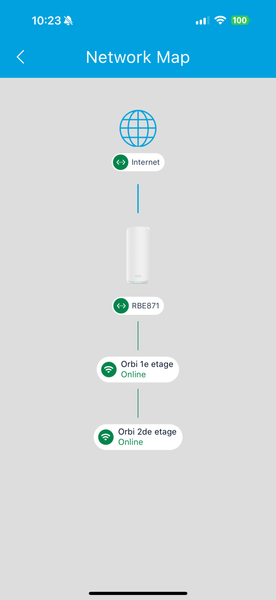
Is the 'connected devices' view in the app broken?
Hello, I have a 3 story home, ground floor my RBR870 is placed and the other 2 floor both have an RBS, the network map shows how the devices are connected. What is not logical: RBR (ground floor)...

donawalt
Mar 26, 2025Hero - Experienced User
I have a 970 and have not noticed this behavior, although I will say the device list can be wonky at times, plus it has a lag of reporting the correct info - but no more than a minute or two. But at other times, I have seen it say WiFi-connected devices are wired, and I have seen connections reported to the wrong Orbi - like you are seeing. Often times for me, a reboot fixes this.
That said - the path of wireless signals can be deceiving. To be sure, have you tried using an app to actually see what the signal strength, in dBm, is from each Orbi device near your doorbell and socket (which I presume are stationary!)?
If you have a Mac, I use the free app from the App store WiFi Explorer Lite - it's excellent and simple to use. You will see real time what the signals are, just walk your Mac over near the doorbell and wait a minute. If you only have Windows PCs, I am sure there are free apps that do the same thing - you need to see dBm.
Unfortunately, using an iPad or iPhone won't work - Apple restricts that wireless data from the network to be gathered by apps, it appears.
If the dBm measurements are close, since there is variation in the signal strength over time (you can see some fluctuation watching WiFi Explorer Lite), that when the doorbell made its decision to connect, that Orbi was the strongest device; later on, another device had a slightly stringer signal, but not strong enough to switch. If you think about it, there needs to be some number of dBm improvement required for a device to switch (5 dBm? we don't know) - otherwise, with normal fluctuations a device would be ping-ponging between devices all day.
Now, if any of your devices are connected say at 2.4GHz to a further-away Orbi, and there is a 5GHz connection from a closer Orbi, that's much more of a concern.
What FW version are you on? A new FW update just came out in the last 2 weeks for the 870, 10.5.17.3.

Crasje
Mar 26, 2025Tutor
I saw I had an update this morning, now remotely updating the devices.
The release notes would be nice to see if there are any fixes in that area.