NETGEAR is aware of a growing number of phone and online scams. To learn how to stay safe click here.
Forum Discussion

Crasje
Mar 26, 2025Tutor
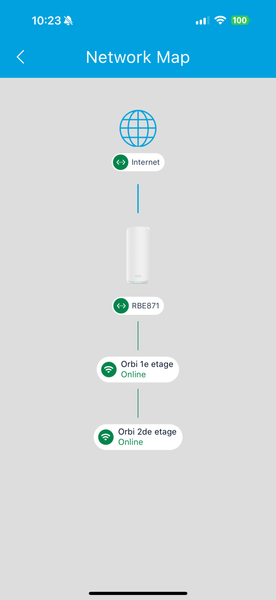
Is the 'connected devices' view in the app broken?
Hello, I have a 3 story home, ground floor my RBR870 is placed and the other 2 floor both have an RBS, the network map shows how the devices are connected. What is not logical: RBR (ground floor)...

Crasje
Jun 15, 2025Tutor
Update, i bought a 3rd satellite and placed it in the back off my living room so I have wifi in the backyard.
today i was watching F1 as i walked on my terrace and after 3 meter i lost connection because my ipad didnt switch from the router to the satellite. So thats another 600 euro thrown away because the Netgear software has issues (my opinion).

BedfordHome
Jun 22, 2025Guide
Within the last month, I recently installed an Orbi 970/971 network for a client (6 satellites). Beside the problems of satellites and number of attached devices being inaccurate, I too have reason to believe the "mesh roaming" is not working properly. Reason I believe this, is that I can walk to another room which is very far from the prior room and conduct a speed test (also observe the number of WiFi bars on the iPad Pro). Each time I turn the WiFi on the iPad OFF then ON, and retest, both the signal strength and speed test results are much higher - most ofter more than twice the speed! I also combined this with observing what devices were attached to each satellite to see whether the client device was in fact 'handed off'; it was not in half the cases.
As for the nodal graph presented in the app it is unclear what exactly is displayed. I mean that there are two primary connection types PHYSICAL and LOGICAL. Certainly the physical topology can influence the graph, i.e. "daisy chaining the satellites" would result in a string of satellites as you have AND the UI being a physical representation. Alternately, if there were a Layer 2 LAN switch serving to connect all the Orbi devices rather than seeing the satellites arrange in a star-topology with the router being in the center, you still might see the 'string of satellites' because the UI is displaying a logical view AND the system has not settled on preferring the physical backhaul over the wireless backhaul. The convergence time for the router and satellites to display as they are truly wired and operating has taken DAYS in this network. NetGear support admits this is a 'known bug' but my greatest fear is that the fix will not come in time before this customer discontinues our relationship.
As donawalt said, there are free wifi signal strength apps available. I use a professional tool but I started out using an inexpensive android tablet with a free app - it provided me with dBm measurements.
Given the effort and troubles I have had in the past 3 weeks with this installation, I clearly believe there are very many serious bugs in the Orbi RBE970 system. I do installs for a living with over 100 ASUS installations and recently starting to roll out Orbi. I have 4 Orbi systems installed without issues to this day but this new RBE97X series has been a total disaster.
- CrasjeJun 22, 2025Tutor
Its unfortunately a worse issue as you think. If i shut down & restart stationary devices (like a wifi controlled wall socket) it will connect correctly to the strongest/closest satellite.
If I check however a few days later, the devices are connected illogical again.
I bought an extra satellite and places it next to the doors to my garden so that I would have a good connecting with my 4k ring video camera mounted to my house just 2,5 meter away overlooking the back yard, but the device connects to a much farther away satellite giving me max 145mbs
- BedfordHomeJun 24, 2025Guide
I feel you pain. I have the same thing. Looking at the app I saw all sats online. next day, no sats online. Then log into each sat and they declare "online". to determine truth, I attach my iPhone to the west most location in the house (turned WiFi OFF then ON). Walked to most east location in the house. Speed test registers sub 100mbps DL. the turn OFF/ON wifi and retest. Results are 700-900mbps DL! In-home roaming did happen. Guess its governed by the router who thinks there aren't any sats in the network.
Here are my inquiries to NG over the past year regarding max sats on 970:
"My conversation with NetGear PRIOR to ordering the Orbi equipment. Highlighted portions illustrate I clearly asked NetGear Support about the intended setup I was planning for you:
(5/22/2025, 10:46:13 AM): what is the maximum number of wired satellites this product supports?
(5/22/2025, 10:46:56 AM): I plan on using an 8 port multi-gigabit switch.
(5/22/2025, 10:47:11 AM): operating at 5Gbps
Elmer N (5/22/2025, 10:47:22 AM): You can use as many satellites you wish to use if you are connecting the satellites vie ethernet cable. The switch you mentioned would be the ideal set-up to go to.
My conversation with NetGear a year ago regarding maximum satellites permitted for your home.:
Joshua R (4/11/2024, 4:10:31 PM): https://kb.netgear.com/31218/How-do-I-configure-my-Orbi-router-to-act-as-an-access-point
There is not a specific guidance or information to say that there is a limit on connecting WAPs, over wired backhaul
Joshua R (4/11/2024, 4:10:52 PM): Orbi does support the AP mode type setup. That can operate behind the existing routers
(4/11/2024, 4:11:29 PM): I thought I read a few years ago when I installed RBK860 that there was a 4 WAP maximum when using wired backhaul.
(4/11/2024, 4:11:39 PM): Has that limitation changed?
(4/11/2024, 4:12:06 PM I don't have any such max limit to WIRED backhaul in the ASUS product line.
Joshua R (4/11/2024, 4:13:00 PM): That information may have been regarding wireless satellite count, which is generally 4. I have not seen or come across a guidance for that specifically. Searching our resources, I do not see that information either "
For over a year NetGear mis-stated the facts regarding max sats in their Orbi 970 product and not claim there is a known bug.
At this juncture, the customer is about to can me and get their NYC apartment AV team to replace me and the network. It's really bad!...m
- BedfordHomeJun 24, 2025Guide
I couldn't find the NetGear Support text that stated this is a known issue but just found it:
"NETGEAR Support Agent
2025-06-21 16:26:02
Dear Marcel,
I understand your concern. We have escalated the case to the relevant team, and they are currently working on pushing a beta firmware update to resolve the ongoing issue. Please bear with us while we await further updates—I will keep you informed as soon as I receive any news.
In the meantime, our next-level team has recommended some troubleshooting steps. Kindly follow these steps and let us know the outcome:
Currently, all six satellites are connected to the router via Ethernet cable. Please try connecting only four satellites via Ethernet and the remaining two via wireless backhaul. This configuration is expected to resolve the issue. As mentioned during the call, it is recommended to use a maximum of four satellites to maintain optimal performance. Using more than four may result in disconnections and degraded performance."I did what they suggested without success.
- BedfordHomeJul 02, 2025Guide
I can only offer an idea that might result in what you want. It's based on the idea that most client devices like to hold onto a connection that they currently have (in spite of a stronger signal being present). One technique some folks use is to reduce the transmit power of the access points so devices further away end up releasing that connection and rehome to a better one. In some products (competitors of NG), you can even set the signal strength threshold at which the access point would drop the client. This again forces the client to rehome to a closer/stronger WiFi access point. I've read that there is a way to reduce the orbi transmit power, but I never tried to do that.
Also, you may have better outcome, if you can forget the WiFi network for that Ring device (i.e. delete it from the Ring Project). Then with your phone/tablet connected to the Orbi RBS you wish the Ring device to connect to, then add that Ring device. Make sure the phone/tablet is connected to THAT RBS, but turning its WiFi OFF then ON so you know it's getting its L2 from that local RBS! The Ring app will share what it knows/thinks to be the network with that newly added RING device. This my guess based on theory of how clients (especially mobile ones) to a WiFi. Given the RING device doesn't move, theres a good chance it will always stay on the RBS you desire, if it were initially configured to connect there.
good luck..marcel
- CrasjeJul 02, 2025Tutor
Hi,
I have a wifi managed wall socket on my top floor. I have shut it off and reconnected and then it does connect to the closest/strongest wifi. I must say that when I check a few days later it is often connected to the satellite on another floor. Its connection actually has to pass the top floor wifi to get to the other one.
Firstly, I don't think it should work like that, imagine having to turn your mobile phone on and off every time you go to a different router - satellite area. Secondly, the devices connecting to the wrong satellite after a while is baffling, It means that satellites loose connection or something during the night causing the wrong reconnects. The Orbi system claims to allow 100+ devices can be attached, imagine having to turn them off and on again on daily/weekly basis.