NETGEAR is aware of a growing number of phone and online scams. To learn how to stay safe click here.
Forum Discussion

PACMAN7
Nov 14, 2020Tutor
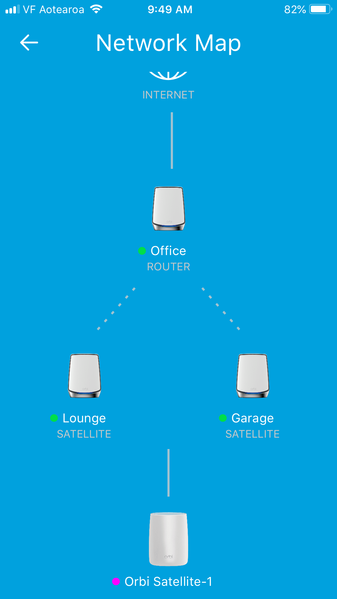
Orbi app Network Map shows unknown unconnected satellite "Orbi Satellite-1" at bottom (RBK853)
Hi folks, I've got the Orbi RBK853 wifi 6 mesh combination (router plus two satellites) and on the Orbi app the network map shows an unknown unconnected satellite called "Orbi Satellite-1" at bot...

Christian_R
Nov 20, 2020NETGEAR Employee Retired
Hi Phil,
May you power cycle your Orbi units and reinstall the Orbi app.
Thanks,
Christian
PACMAN7
Nov 21, 2020Tutor
Hello Christian_R. Thanks for repying.
Yes, I've tried that, and I'm still getting an extra icon in my network map. It also changes from being at the end of a dotted line, to a solid line. And can be my iPhone, my sons iPad, even my iMac computer - but always with a pink dot alongside. I've tried changing channels 1, 6 & 11 and also update the firmware on the router and both satellites.

- PACMAN7Nov 21, 2020Tutor
Here's another snapshot from previously.
