NETGEAR is aware of a growing number of phone and online scams. To learn how to stay safe click here.
Forum Discussion

paliz
Jun 22, 2022Aspirant
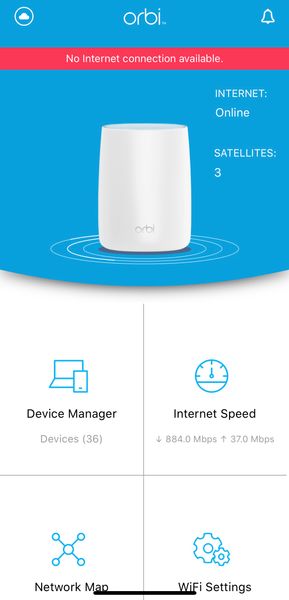
Orbi RBR50 has GREAT internet connection, yet Orbi App displays "No internet connection available."
Netgear Community, please help... I'm running an Orbi Mesh WiFi (1st generation) w/ 3 RBR50 satellites with 1Gbps data speeds and have great Internet connection throughout all devices connected. Yet,...
paliz
Jun 22, 2022Aspirant
How can I check that, and ensure my Orbi is in a double NAT? I’m not that saavy of a networking user.

KevinLiT
Jun 22, 2022NETGEAR Moderator
Hello paliz,
Welcome to the NETGEAR Community!!
This error is usually caused by the private IP address on your iPhone. Try turning your private IP address then close and reopen your Orbi app.
Turn off the Private IP address by navigating to "Settings">"Wi-Fi"> "i" (icon on the left)> "Private Wi-Fi Adress" toggle off.
Best,
Kevin
Community Team