NETGEAR is aware of a growing number of phone and online scams. To learn how to stay safe click here.
Forum Discussion

DaveLeitch
May 29, 2024Guide
850 new satellite syncs but doesn't show up in list of connect devices
Hi I have an RBK 850 system which had the router two ethernet (was 3) connected satellites and a further wireless connected satellite on 2.4 Recently one of the ethernet connected satellites no l...
DaveLeitch
May 30, 2024Guide
The home is large enough and has lots of brick. There are no nearby wifi neighbours. The router would be at least 30 metres from the nearest residence and there is a national park or football ground around 60% of the boundary. I think the issues are entirely contained to this mesh. Or should that be mess. Never mind.
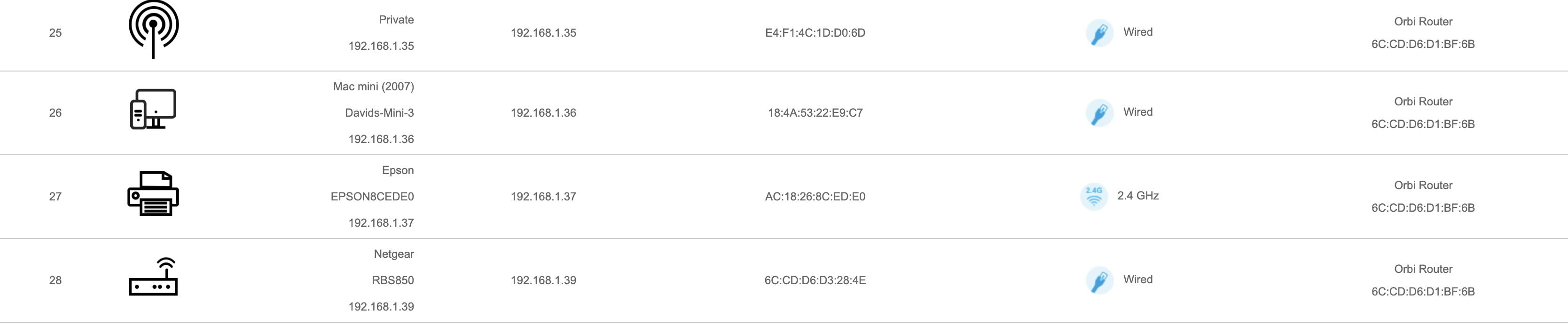
Now that I look again at the connected device list I see that the the software sees the new satellite as a router. I wanted to up load a screenshot from Orbilogin of the connected devices, but the forum software is too buggy. Sigh. But typing out some lines from the device list:
Device 22 "Private" 192.168.1.35 wired "Orbi Router" and then a hex string
Device 26 "Netgear RBS850" 192.168.1.39 wired "Orbi Router" and then the same hex string
My reluctance to go through an extensive rebooting process is because there are cloudflare tunnels and port forwarding considerations, all of which have to be restarted separately. I do have one computer, connected via ethernet to a satellite tthat itself has ethernet backhaul which is on a fixed subnet IP address. However when I do eventually have to do it I will follow the sequence you suggest. Thank you. What I would like, if possible, is suggestions I might try before rebooting.
DaveLeitch
May 30, 2024Guide
The router firmware is 7.2.6.31_5.0.24
Two satellites are on 7.2.6.31 one satellite is on 4.6.14.3. That's despite me hitting the update button.
- FURRYe38May 31, 2024Guru - Experienced User
Ok then, if you have access to the one RBS that has v4 FW loaded on it, you'll need to manually update that RBS to v.31 using a wired PC and web browser please.
To upload a picture in the forums, you can either attached a PDF or PNG or JPG to the Drag and Drop option below the post input box is or use the camera icon to embed a picture file with in the post input box.
- DaveLeitchJun 02, 2024Guide
I manually updated one satellite to 7.2.6.31 and rebooted.
However so far that hasn't changed the issue that 4th satellite, the new one, is not showing up as a satellite but as a "router"
Personally I found my system hanging when I tried to upload a .jpg. No doubt it was my fault, it generally is, however I have uploaded many, many images to many forums without too much trouble in the past. 🙂 And run my own website etc.
- FURRYe38Jun 02, 2024Guru - Experienced User
The 4th satellite is showing up as a device, not a router. Does the 4th RBS not appear in the connected satellites above?
Does the RBS appear in the top section if you turn OFF all other RBS?
How are you syncing the RBS? Button on the RBS and RBR?
Does using the Add Satellite feature on the RBRs web page successfully sync the RBS to the RBR?
 raven_auJun 02, 2024Virtuoso
DaveLeitch wrote:The router firmware is 7.2.6.31_5.0.24
Two satellites are on 7.2.6.31 one satellite is on 4.6.14.3. That's despite me hitting the update button.
You should be able to connect a computer to one of the satellite ethernet ports.
I think that if you factory reset the satellite but don't press the sync. button it should get (you might need to wait a while) an ip address of 192.168.1.250 (the reason I don't include 250 in the DHCP range).
Once connected the satellite GUI can be used to update the firmware.
- raven_auJun 02, 2024Virtuoso
raven_au wrote:
DaveLeitch wrote:The router firmware is 7.2.6.31_5.0.24
Two satellites are on 7.2.6.31 one satellite is on 4.6.14.3. That's despite me hitting the update button.
You should be able to connect a computer to one of the satellite ethernet ports.
I think that if you factory reset the satellite but don't press the sync. button it should get (you might need to wait a while) an ip address of 192.168.1.250 (the reason I don't include 250 in the DHCP range).
Once connected the satellite GUI can be used to update the firmware.
Interestingly I just saw a post that says Orbi AX uses 192.168.10.250.
I've never seen that myself, but I thought you may need know about it.