NETGEAR is aware of a growing number of phone and online scams. To learn how to stay safe click here.
Forum Discussion

Amirlit
Nov 14, 2022Guide
960 Firmware V6.3.7.5 No more CTS/RTS Setting
In the past, you could find the CTS/RTS settings for wireless under Advanced, Advanced, Wireless settings. But now its not there! Any idea how to find it or change in the new Firmware?

Amirlit
Nov 15, 2022Guide
Maybe. But I have Devices that won’t connect now and they used to. And the fix was changing those values. So I need to know how to change them.
Does anyone know how to change them with this new firmware?
Does anyone know how to change them with this new firmware?

FURRYe38
Nov 15, 2022Guru - Experienced User
IF they are not in the UI any longer then there isn't any way to change them as the feature has been removed from user access.
What devices do you have that are not connecting?
How is the RBRs wifi settings configured?
Are you using the IoT or separate SSID networks at all?
What is the size of your home? Sq Ft?
What is the distance between the router and 📡 satellite(s)? 30 feet or more is recommended in between RBR and RBS🛰️ to begin with depending upon building materials when wirelessly connected.
https://kb.netgear.com/31029/Where-should-I-place-my-Orbi-satellite 📡
Has a power off for 1 minute then back ON with the ISP modem and router been performed since last update?
Be sure to restart your network in this sequence:
Turn off and unplug modem.
Turn off router and computers.
Plug in and turn on modem. Wait 2 minutes for it to connect.
Turn on the router and wait 2 minutes for it to connect.
Turn on computers and rest of network.
Has a factory reset and setup from scratch been performed since last FW update?
- AmirlitNov 15, 2022GuideTake a look at this older thread I posted with a description of my problem and the solution I implemented based on recommendation (which worked)
https://community.netgear.com/t5/Orbi-WiFi-6-AX-and-WiFi-6E-AXE/IoT-and-Mesh-Satellites/td-p/2209220
Happy todo a new solution if there is one out there. But none of my IOT devices are connecting right now.
Amir- FURRYe38Nov 15, 2022Guru - Experienced User
What devices do you have that are not connecting?
How is the RBRs wifi settings configured?
Are you using the IoT or separate SSID networks at all?
What is the size of your home? Sq Ft?
What is the distance between the router and satellite(s)? 30 feet or more is recommended in between RBR and RBS️ to begin with depending upon building materials when wirelessly connected.
https://kb.netgear.com/31029/Where-should-I-place-my-Orbi-satelliteWhat happens if you turn OFF the RBS. Set IoT network for no WPA security, set it to NONE. DO any devices connect to this network?
Please provide feedback to the questions presented so we can get a better idea of your configuration.
- AmirlitNov 16, 2022Guide
So i turned off both my RBS but there is NO WAY to set the password to null. I have tried blank, and as you suggested, NONE. But it states im not hitting the default minimum password. I changed the password to something simple like 11223344 and still not able to connect.
Additionally, even though I've sort of answered all these questions in other posts, I'll try again to summarize.
Devices that cannot connect are:
Inifinti Gen1 Thermostat
HBN Wi-Fi outlet
And I havent tested others. I will say my personal Iphone 13 does connect to the IoT Wifi
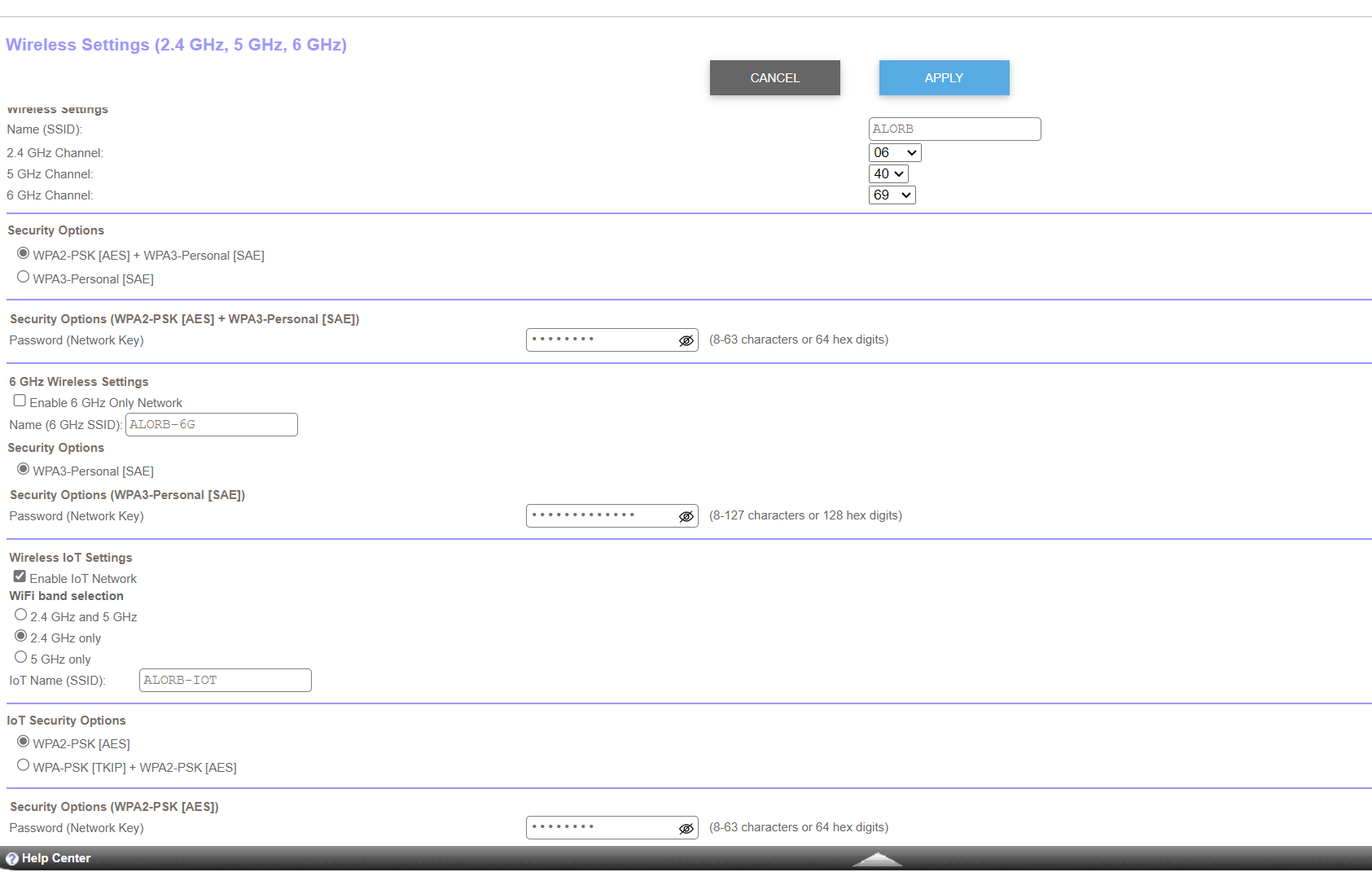
My Wifi RBR Config is attached in the screen shot
I am using IoT network and seperate SSID's for all networks
Home size is ~2400sq/ft
Distance between routers is < 30 ft but speerated by 2 floors and walls (one is in the garage)
I have done a full power-off process. No luck
I have disconnected both RBS, no luck.
And unless anyone else has any idea's, I'm going to down grade the firmware.
Once again ,I'l ask. Does anyone know ANYWAY to change the CTS/RTS settings in this latest firmware?
Amir
Any other ideas?
- AmirlitNov 15, 2022Guide
OK, let me copy/paste from the previous post.
1 have 1 router and 2 satellites. They are probably ~30ft apart but separated by floors and some thick walls (one of them is in the garage). I have an old Carrier Infinity Thermostat. I setup my IoT Wi-Fi for 2.4gz only. and also some external lighting. They were all connected to the same IoT 2.4gz connection pre-firmware update. Initially i had problems connecting, I disabled AX model for the 2.4gz and I also changed the CTS/FTS Threshold to 2347, per the previous post that I posted on this thread. Those 2 things worked! and I was able to connect all my devices to the IoT SSID.
Now I updated the firmware and did a full reset of the Routers/Satellites. And now, these same devices can not connect again. Are we literally saying the only solution is a full shutdown and reboot?
I cant believe they took these settings away...
- FURRYe38Nov 15, 2022Guru - Experienced User
How is the RBRs wifi settings configured?
What channels are being used on the RBR?
Are you using the IoT or separate SSID networks at all?
What is the size of your home? Sq Ft?
So disabling AX mode still doesn't help?
Try disabling wifi security temporarily on the IoT network on the RBR and see if any of the IOT get connected here? Re-enable WPA2 and AES on the IoT network.
Try turning OFF the RBS as well and let the devices connect to the RBR.
 KevinLiTNov 16, 2022NETGEAR Moderator
Hello Amirlit ,
Thank you for your post!
I understand that you are having issues establishing a connection between your Orbi mesh network and your IoT devices. Please change your wireless IoT settings to 2.4Ghz only then connect your IoT devices to your network.
Please navigate to the link below for instructions on how to configure your IoT network:
Best,
Kevin
Community Team
- AmirlitNov 16, 2022GuidePlease PLEASE read the full thread before posting things like this.
Amir