NETGEAR is aware of a growing number of phone and online scams. To learn how to stay safe click here.
Forum Discussion

plsee74
Jun 04, 2022Tutor
Add new satellite 752
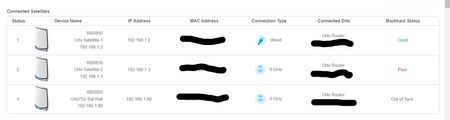
Hi, INeed some advise why is the RBS 750 showing as out of sync on. The RBR 850, RBS 850 and RBS 750 are already on the latest firmware 4.6.8.2. I try to factory reset the RBS 750 but the result ...
- Jun 05, 2022
Thanks for the advise.

plemans
Jun 04, 2022Guru - Experienced User
the one saying "out of sync" is hardwired into the router?
did you check the cable?
have you tried factory resetting the satellite and re-syncing it?
plsee74
Jun 04, 2022Tutor
Yes. I did change the cable. (FYI. The RBS750 satellite is connected thru Dlink Gigabyte switch before connecting to RBR 850)
Also did the factory reset after flashing to the latest firmware. (Including re-sync) Still got back the same result.
The strange thing is it show out of sync on the attached device page but when I connect to the Sat via IP address, I'm able to see device being attached to it.
Also I did a speed test from the area where the Sat is located, I'm getting good speed on my laptop and smartphone. Seem to me it is working fine. Just not sure why it is showing out of sync on the attached device page
- plemansJun 04, 2022Guru - Experienced User
have you tried moving it (temporarily) to where the router is and direct connecting it? Maybe its an issue of the switch
- plsee74Jun 04, 2022Tutor
Prior to me moving back to the location, I connect the RBS 750 directly to the RBK 850 when i did the firmware upgrade to 4.6.8.2. After the upgrade, i try to do the sync. On the attached device screen, it is showing as out of sync.
Did some reading on the NG community forum, factory reset the RBS 750 and repeat the sync again with the RBS 750 connecting directly to the RBR 850 switchport.
- FURRYe38Jun 04, 2022Guru - Experienced User
What is the model# of the D-Link switch?
