NETGEAR is aware of a growing number of phone and online scams. To learn how to stay safe click here.
Forum Discussion

irish36
Jun 22, 2021Tutor
Adding RBR750 to a Centurylink C3000z modem/roter
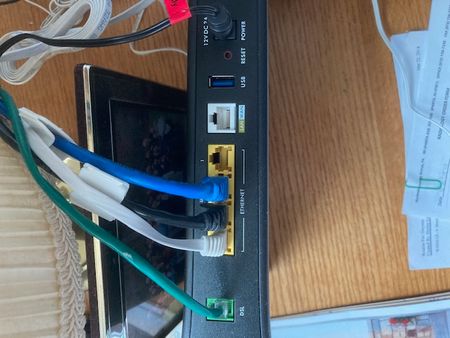
My zycel c3000z modem/router is supplied by my ISP (Centurylink). I'm trying to add my RBR750 as the router and wireless component. Where do I plug in the RBR750 to the zycel to make it take ...
- Jun 28, 2021
Great on the laptop! Macs and the iPad should be able within the WiFi software "Renew" the lease on the connection that should clear out the old set up and grab the latest. Or "forget" the connection and relink to the WiFi. That's what I have to do every so often.
Well at least you got an education?!
Cheers ! 🍻

FarmerBob1
Jun 25, 2021Luminary
Great to hear you got through the rough part. Usually when you put a router/modem in Transparent Bridge Mode you shouldn't need to get back into it unless you are going to revert it back to being your main device. Why do you want to get into it?
The 192.168.0.2 is for the LAN from the Orbi ( 2 > ). And that was in the explanation I pasted. That's a 50/50. Since the Orbi has to sign in, it is the "main" unit and will most likely give itself the IPA of 192.168.0.1, ( 1 > ). Therefore, your IPA range should automatically set itself starting at 192.168.0.2 - .0.254 and that is all pretty automatic and "router basic". There are several sets of IPAs that are used in networking and I learned the .0.2 from Netgear. Other brands may use a different IPA string. It's all personal reference within the rules of IP Addresses. BUT since you got this far and are at a point to focus on trouble shooting the Orbi, it'll be easier to learn the set up and idiosyncrasies of the Orbi. Of which it looks like you have your first issue.
First, I would surmise that you didn't set up the WiFi? That should have been part of the setup proceedure when the Orbi was first fired up depending on how you set it up. Or like I do, I bypass the "auto" set up and do it all manually. Mostly because we have to do the "Tagged 201", which you didn't since the C3000Z did it. That really tricks the Orbi when it can't connect to the Internet when it's time. So if you did setup the WiFi, I find it curious that only the Apple gear won't connect. But not surprised. Does either device see the SSID (Super Secret ID), some super secret? And what brand is the Laptop? I have most all Apple gear but have not had any issues with it connecting. ALTHOUGH, I have seen places in the forums where Apple connectivity issues were discussed. So I guess there can be issues. If you didn't set up the WiFi look on the bottom of the main unit and the label there should be its default User Logins and Passwords for both the router and WiFi. You could try that to see if you can connect. Then that also means that the WiFi is not set up as you need it yet. That will be next lesson, Grasshopper.
Mesh systems are a "different" animal. I had problems with getting some of my WiFi lighting to connect since it'll only use the 2.4GHz bandwidth and Mesh is both combined. So I went in and turned the 5GHz band power down as far as I could since you can't really turn off either band. That would not be the "Meshy Way". That helped get them on the network. But everthing else as in Computing hardware, I haven't had any problems. Older hardware might be a problem.
Can you tell me a little more or if you haven't gotten that far in the setup, less, that seems strange?
irish36
Jun 25, 2021Tutor
Hi,
I did set up wireless but my assignments came up different than yours.
The C3000Z had a router ip address of 192.168.0.1 and the ORBI came up as 192.168.1.1 .
I have 3 devices plugged into the ORBI Router ethernet ports with addresses in the 192.168.1.x range and 2 appear on the 5G wireless connection (iphones) in the 192.168.1.x range. Those devices are working OK.
I can't get the Toshiba laptop and my old Apple iPad to connect. I've looked for ways to validate what router address those two devices are looking for but I can't find it. That's why I was trying to get back to the C3000Z to see if there might be a conflict there.
In addition I have a brother printer that I used to be able to access by wireless but now I have to use a USB connection - it wouldn't connect wirelessly.
One last thing - I just saw that the ORBI AP setting is off. Is that the problem?
Thanks again for your time and patience.
- FarmerBob1Jun 25, 2021Luminary
What you discovered is the IPAs being as they are, and how I figure out how to do what, mostly how to get into the C3000Z. You may need to change the IPA on the device you are using to connect to .0.2. So the .0.1 would be the IPA you use to get into the C3000Z and the .1.X is your Orbi LAN IPA. 192.168.1.1 being the address for the Orbi's access.
No there won't be any conflict with the C3000Z. Once you put it into Bridge Mode, it is no longer a router, just a modem and as I said will just sit. That's why you have to use to login on the Orbi to login to your ISPs Internet connection. So that's a bit of a dead end.
Your two devices that won't connect are not looking for IPAs. They are looking for a WiFi frequency that they understand and can pull in the SSID, of which you will select and use the password to connect. Once connected they will be assigned an IPA. You can try entering your WiFi info manually, negating them having to find it, which seems to be a problem that could be due to they can't interpret their mixed 2.4/5 siggnal. Giving them a little help usually works. And you can look in the "Connected Devices" list to see what IPA are not being use and manually enter that with the SSID and PW. So they are a litle more apt to meet up.
Brother printers are a P.I.T.A!!!! Make sure you have the newest Firmware on it that if it lists it associates with a particular OS/Rev of that OS, Machine, etc., try to match it up as best as you can to the printer and a main computer for easier set up. May have to do it hardwired first, then go wireless.
The Satellite may be too far away. You might want to connect it close and then move it away until you lose the signal or get it to where you want it. The "Backhaul" for them is 5GHz. So better penetration threw things and big data transfer, but little distance.
My pleasure to be of help. I remember when I first started playing with this stuff luckily for me it was a whole lot simpler. Otherwise I'd have more brain damage than I do now.
- irish36Jun 26, 2021Tutor
Hello FarmerBob1,
Thanks for your advice
Itseemed tome that my laptopwasstill looking for the old networks that were on the C3000Z, so I decided to uninstall my wi-fi deviceand reinstall it. That did the trick. After that I was able to selecet the network name and attach to the network. The laptopseems to do all the networkfunctions id did before I enstalled the ORBI.
Now, on to getting the iPad to connect.
Thanks again for your help.
- FarmerBob1Jun 28, 2021Luminary
Great on the laptop! Macs and the iPad should be able within the WiFi software "Renew" the lease on the connection that should clear out the old set up and grab the latest. Or "forget" the connection and relink to the WiFi. That's what I have to do every so often.
Well at least you got an education?!
Cheers ! 🍻
- irish36Jun 28, 2021Tutor
Thanks so much for your help Farmerbob1. Now I have a workable system.