NETGEAR is aware of a growing number of phone and online scams. To learn how to stay safe click here.
Forum Discussion

ohmoeron
Feb 09, 2022Aspirant
AX6000 (RBR850) Public IP Address not releasing ???
I just had a long converstation with Spectrum tech support (fully believing it was their faul) that they were issuing me an IP address that was outside of my local area. I live in central ohio but w...
ohmoeron
Feb 09, 2022Aspirant
Just got done factory resetting everything, re configuring the network and same results...still getting that Kentucky IP address. If I ethernet directly from Spectrum modem, I get the proper Ohio IP address.
Any other thoughts? I don't believe it's viable to discard $999 worth of network equipment because it won't release a public IP adddress.

FURRYe38
Feb 09, 2022Guru - Experienced User
Is the WAN IP Address your seeing the modem when directly connected to it, is it the same as what is being seen on the RBRs web page under Advanced Tab/Internet or something different?
You can try this FW out. We've seen better results with this version:
I would download the FW files. Install to the RBS first then RBR lastly. After the units are ready, power OFF the RBS and RBR for 1 minute then back ON, I'd do a full on factory reset on the RBR and setup from scratch with the RBR not connected to the modem. Be sure to not enable any Armor, SPC or Traffic Meter. Might try IPv6 enabled if you haven't tried this. Leave the RBS OFF while setting up.
After the RBR is set up, power it OFF. Power OFF the ISP modem, then reconnect the RBR to the modem, then power ON the modem and let it sync. Power ON the RBR and let it sync.
Check results...
- ohmoeronFeb 09, 2022Aspirant
I'll have to try the firmware route.
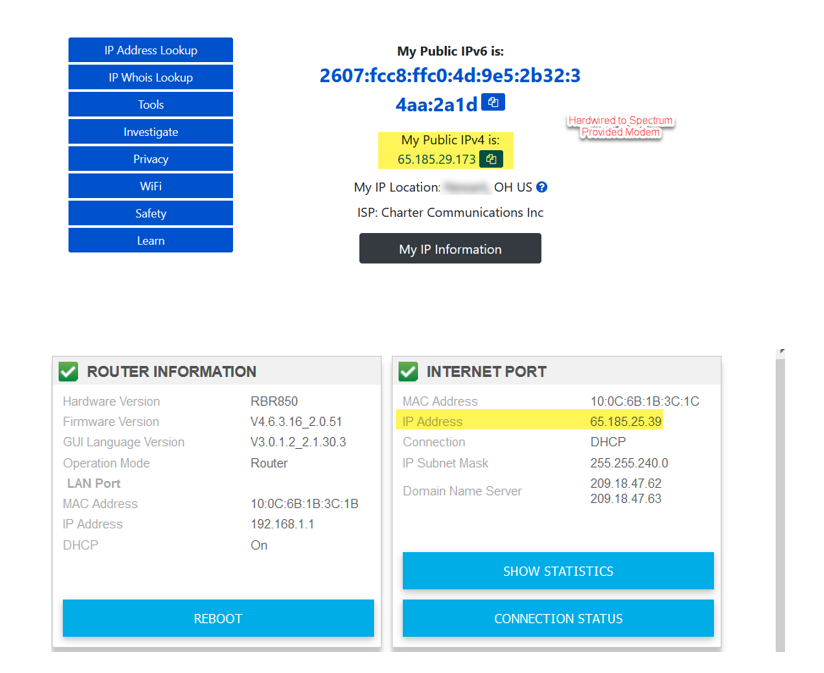
See attached for image showing results from WhatismyIP hard wired from laptop to modem, then what the Orbi says when I am connected via wi-fi.
- Patone407Feb 09, 2022Tutor
Does it give the same public IP result when you connect your laptop to Orbi via
1. ethernet (& wifi turned off)
2. over wifi (& no cable in ethernet port)?
- FURRYe38Feb 09, 2022Guru - Experienced User
Both of those addresses fall under same subnet which belongs to Spectrum and seems to be located in Ohio:
https://www.ipaddress.com/ipv4/65.185.0.0
Ok, there maybe a proxy address being used for unknown reasons:
https://www.ipqualityscore.com/free-ip-lookup-proxy-vpn-test/lookup/65.185.25.93
Seems to still fall under Spectrums IP range:
https://whois.domaintools.com/65.185.25.39
Same for:
https://whois.domaintools.com/65.185.29.173
What Time Zone are you in? What TZ is set on the RBR?
ohmoeron wrote:
I'll have to try the firmware route.
See attached for image showing results from WhatismyIP hard wired from laptop to modem, then what the Orbi says when I am connected via wi-fi.
- ohmoeronFeb 09, 2022Aspirant
Starting to wonder if this is a Geo-Location to IP address issue...when I looked the Geo-Location for the IP address, the same IP is in either Kentucky or Ohio depending on the database provider.
To answer your question, it's set to EST (same as I am).
- CrimpOnFeb 09, 2022Guru - Experienced User
ohmoeron wrote:
See attached for image showing results from WhatismyIP hard wired from laptop to modem, then what the Orbi says when I am connected via wi-fi.
Would it be convenient to add one more step to this analysis? Use the "what is my IP" web site while the Orbi is connected to the modem.
My understanding is that consumer routers do not "hold on to" public IP addresses. When powered up, they do a DHCP request to the ISP and that is the IP address that they display on the Internet panel. (This is one of the first steps often used to diagnose a possible Double-NAT. If the 'public IP' starts with 192.168 then the Orbi is connected to another router, not directly to the ISP.) Unless the subscriber has signed up (and paid) for a static IP address, then the ISP is free to change the public IP at any DHCP renewal.
My hunch is that the ISP is assigning one IP when the Orbi is connected and a different IP when the laptop is connected. The significant difference is the MAC address of the connecting device.
It also should make no difference whether the laptop is connected to the Orbi with ethernet or WiFi.
So:
- Step 1: connect laptop to modem and check what's my IP?
- Step 2: connect Orbi to modem, record public IP from Advanced Tab.
- Step 3: use laptop and check what's my IP? Which does it match? (step 1 or step 2)
- FURRYe38Feb 09, 2022Guru - Experienced User
His modem is only a modem so he's in a Single NAT condition.