NETGEAR is aware of a growing number of phone and online scams. To learn how to stay safe click here.
Forum Discussion

Zooropean83
Sep 01, 2021Aspirant
Can't downgrade FW on RBR750
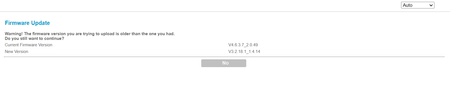
Hi I've been having some ongoing issues with my Orbi setup (RB753) which official Netgear support suggested I downgrade the FW to solve (the poblems began when 4.6.3.7 auti-installed). I have...
Zooropean83
Sep 06, 2021Aspirant
Many thanks for your help, FURRYe38.
The link about using debug mode in Edge did indeed work - thank you for sharing it.
Downgrading the FW solved the issue but of course within an hour the router auto-updated the FW again. However support now tell me they have "elevated" the problem to a "higher tier". I imagine this means they will suggest I download the beta FW you have just mentioned.
Thanks again for your help.

Foden
Dec 13, 2021Apprentice
Hi,
If you block 'devcom.up.netgear.com' and 'http.fw.updates1.netgear.com' - yes it really does need the 'http.' to be included - then the automatic firmware update will fail with "Service unavailable"
What was the trick to downgrade from v4 to v3 firmware? (found it)
Zooropean83 wrote:Many thanks for your help, FURRYe38.
The link about using debug mode in Edge did indeed work - thank you for sharing it.
Downgrading the FW solved the issue but of course within an hour the router auto-updated the FW again. However support now tell me they have "elevated" the problem to a "higher tier". I imagine this means they will suggest I download the beta FW you have just mentioned.
Thanks again for your help.
- FodenDec 13, 2021Apprentice
Figured it out the hard way and then found the easy way - follow this https://community.netgear.com/t5/Orbi-WiFi-6-AX-and-WiFi-6E-AXE/RBK750-Series-Firmware-Update-v4-6-3-7/m-p/2130584#M18586 (Post 77 and/or 78)
Am now on V3.2.18.1_1.4.14 on the router, going to downgrade the satellite now
Absolutley ridiculous process to go throught to try and get your router working the way its supposed to out of the box!
BTW NG the Traffic Meter seems to have been an issue with all your router series for about the last 10 years!
- FURRYe38Dec 13, 2021Guru - Experienced User
Be sure you block FW upates using a upstream router or the system will auto update back to v4.
Foden wrote:
Figured it out the hard way and then found the easy way - follow this https://community.netgear.com/t5/Orbi-WiFi-6-AX-and-WiFi-6E-AXE/RBK750-Series-Firmware-Update-v4-6-3-7/m-p/2130584#M18586 (Post 77 and/or 78)
Am now on V3.2.18.1_1.4.14 on the router, going to downgrade the satellite now
Absolutley ridiculous process to go throught to try and get your router working the way its supposed to out of the box!
BTW NG the Traffic Meter seems to have been an issue with all your router series for about the last 10 years!
- CrimpOnDec 13, 2021Guru - Experienced User
If you do not have an upstream router to block the Netgear sites, you can always try the OpenVPN method:
Post #10. Sign up for a free account.


