NETGEAR is aware of a growing number of phone and online scams. To learn how to stay safe click here.
Forum Discussion

Taylorinnyc
Sep 28, 2021Guide
Cbr750 speed issue with comcast
Thanks in advance for all help. I replaced my xfinity modem/router with the cbr750 modem/router and satellite. After installing my speeds were in my normal range of 1000-1400 mbps. Two days ago the s...

- Oct 05, 2021I’m sorry, got so crazy with all of this and never updated what happened. On my last call with the orbi support guys, he finally said to me that the orbi system may not be best for my setup and the size of my house. He recommended I return it and buy a cm2000 modem and a rax200 router. I took apart the orbi system and returned it, the nighthawk stuff arrived the next day and I installed everything. So far I have great speeds and signal throughout the house. I was surprised that he said the orbi wasn’t right for me but so far the nighthawk system seems great. I really appreciate all your help, so sorry I didn’t update. I just got so frustrated that it slipped my mind. Thank you!
Taylorinnyc
Sep 28, 2021Guide
Thanks so much for your help, I think the requested photos are waiting for approval. I’m not that tech savvy, what exactly do I need to ask the xfinity tech on Thursday as far as provisioning goes? The NetGear support people said that there are some channels not locked that should be and said that Comcast would fix that, Comcast says they don’t fix that. I’m just at a loss because my speed was great when initially installed then just took a dive. Just wondering if this setup is even the right answer for me?

FURRYe38
Sep 28, 2021Guru - Experienced User
Please use the Choose File button on a post to attached picture files to as we have to wait for inline pictures to be approved.
- TaylorinnycSep 28, 2021Guide
- TaylorinnycSep 28, 2021Guide
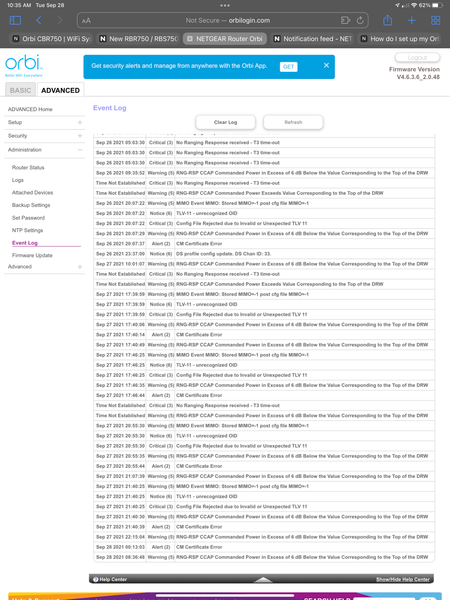
- TaylorinnycSep 28, 2021GuideCan you see the photos I sent?
- FURRYe38Sep 28, 2021Guru - Experienced User
Well I see all channels lock in accept for 32 which is ok.
However you have a ton of critical events that the ISP needs to look into. Have the tech, if there stopping by to take a look at these event logs. These have to be corrected by the ISP.
Have the ISP check the signal and line quality UP to the modem. Be sure the ISP provisions the modem correctly.
Be sure there are no coax cable line splitters in the between the modem and ISP service box.
Be sure your using good quality RG6 coax cable up to the modem.
https://community.netgear.com/t5/Cable-Modems-Routers/General-info-and-Troubleshooting-for-Cable-Modems/m-p/1530376#M12853- TaylorinnycSep 28, 2021GuideOne last question, Comcast is claiming that the orbi is not capable of the speed on my plan. I think that’s false? It was operating at the same speed as my Comcast modem when it was first installed. Am I correct that that’s not true? I want to have my facts straight before the tech visit. Again, thanks so much for your help. I really appreciate it.

