NETGEAR is aware of a growing number of phone and online scams. To learn how to stay safe click here.
Forum Discussion

swong65
Oct 26, 2024Aspirant
Firmware update issues with RBR/RBS750
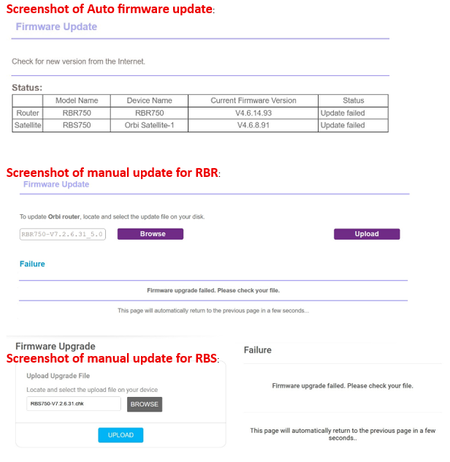
Hi, am posting here and hoping for a solution for the issue encountered. Have gotten RBK752 from a friend of mine and both RBR & RBS 750 were installed with V4.6.8.91 firmware. I reset both router ...
swong65
Oct 26, 2024Aspirant
I tried to update the RBS first but with no success.
I have always used a wired PC (to RBR) for the tasks but still have no success; and using mainly MS Edge only.
I have even borrowed a RBR850 (firmware V7.2.6.31) and in the auto update, it detects new firmware V4.6.9.11 for the RBS750 but also experienced same error message for both auto and manual update.

FURRYe38
Oct 27, 2024Guru - Experienced User
Have you tried to manually apply the v4.6.9.11 RBS firmware first, then see if v7 FW will take?
I presume you are unpacking the .zip file to reveal the actual .chk FW file that needs to be loaded thru the RBS web page right?
- swong65Oct 27, 2024Aspirant
I have tried manually to apply the v4.6.9.11 RBS firmware (unzipped filename: RBS750-V4.6.9.11-signed.chk) on the RBS webpage, with the same error message: Firmware upgrade failed. Please check your file.
I have also tried earlier version of the firmware such as v4.6.8.5, and the result is the same.
- FURRYe38Oct 28, 2024Guru - Experienced User
Something you can try to see if a forced update can be pushed:
Try nmrpflash:
https://github.com/jclehner/nmrpflash