NETGEAR is aware of a growing number of phone and online scams. To learn how to stay safe click here.
Forum Discussion

Zooropean83
Nov 21, 2022Aspirant
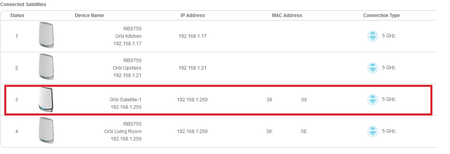
'Ghost' RBS750 Satellite
Hi, A new RBS 750 has appeared on my system (RBR750 plus 3 RBS750s all on wireless backhaul) and I don't know how. It appears to be a duplicate of another satellite (with a two digit different MA...
Zooropean83
Nov 22, 2022Aspirant
Thanks for the reply.
As I said, it is appearing in the iOS app and the web client, but seeing as they are showing different MAC addresses and serial numbers, I would be confident this is not a browser cache issue, anyway.
As mentioned there has been a reboot of the system and that has not solved anything.
All the other questions you ask (sq ft, ONT etc) seem irrelevant I’m afraid as the system has been running perfectly for months - it is only yesterday this started, with no change in physical setup or configuration, bar an auto FW update over a week ago.
As I said, it is appearing in the iOS app and the web client, but seeing as they are showing different MAC addresses and serial numbers, I would be confident this is not a browser cache issue, anyway.
As mentioned there has been a reboot of the system and that has not solved anything.
All the other questions you ask (sq ft, ONT etc) seem irrelevant I’m afraid as the system has been running perfectly for months - it is only yesterday this started, with no change in physical setup or configuration, bar an auto FW update over a week ago.
Zooropean83
Nov 22, 2022Aspirant
Oddly, having left it for 24 hours the “ghost” satellite has now begun showing as disconnected allowing me to remove it in the admin.
As mysteriously as the problem begun, it’s now mysteriously given me a way of fixing it - despite zero changing!
As mysteriously as the problem begun, it’s now mysteriously given me a way of fixing it - despite zero changing!
- FURRYe38Nov 22, 2022Guru - Experienced User
Try a factory reset on the RBR and setup from scratch if you see this again.
