NETGEAR is aware of a growing number of phone and online scams. To learn how to stay safe click here.
Forum Discussion

Foden
Jan 13, 2022Apprentice
How many MAC addresses does the series 7 Orbi have?
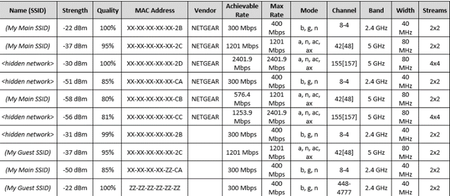
I'd wager 10, see table below - X means the character matches exactly in the MAC address, Z means it doesn't. You can see there are groups where they match exactly except for the last 2 least signifi...

Foden
Jan 14, 2022Apprentice
Thanks, it is - looking more at Wi-Fi quality/availability/utilization rather than client info
My series 7 Orbi does not respond to "/hidden_info.htm" it just redirects to the main page
Best info I've seen so far is from WiF-Scanner 21.05 and Acrylic - both sadly trials. They show that the 2.4Ghz main and gust Wi-Fi are all over the place. These beign the 2 with the significant drops below - graphs are from 2 different apps to double-check their findings. Will test on a call later on and see what that looks like

CrimpOn
Jan 14, 2022Guru - Experienced User
WiFi Analyzer shows similar patterns, except some of the access points do not change significantly. If you come across an explanation for what causes the radio signals to vary in strength, please post a link.
- FodenJan 14, 2022Apprentice
Yep, used 2 to check the results - no clue so far what causes the drops - will keep looking
- FodenJan 14, 2022Apprentice
Don’t see anything corresponding from neighbors Wi-Fi with the graph drops either
Using these apps at present
Wi-Fi Scanner
https://lizardsystems.com/wi-fi-scanner/
NetSpot
I’ve made numerous WhatsApp calls and the recipient ends up hearing reconnection beeps after a few mins, but I can hear them talking, and the beeps, all the time. Calls ultimately fail, no signs of any drops on the graphs I’m waiting
Also tried Alexa video and voice calls and they do not suffer the same issues, even though I’m mainly using the same phone
- FodenJan 15, 2022Apprentice
Just noticed that the Netgear A6200 USB NIC will only connect to the Orbi on a 2.4Ghz channel. It's quite happy to report details from 2.4 & 5Ghz networks
I'm running Win 11 Pro, Netgear driver pack v 1.0.0.26-1 which contains driver v6.30.145.30 dated 2013-04-03 once installed
Fixed
Weird setting in the driver was the issue
- Go to Device Manager / Network Adapters / Netgear A6200 WiFi Adapter
- Click on the Advanced tab and then look for IBBS in the list of options. Mine was set to default 802.11a/b, change it to 802.11a/b/g/n Auto
As with all technology YMMV