NETGEAR is aware of a growing number of phone and online scams. To learn how to stay safe click here.
Forum Discussion

bcfleischmann
Dec 28, 2023Aspirant
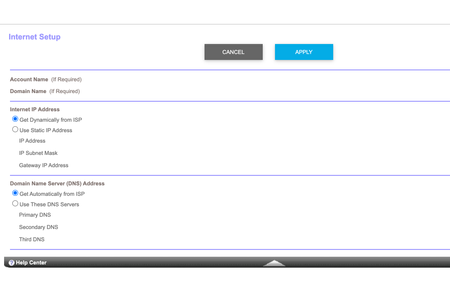
I am having trouble being able to get my Verizon router to go into IP pass through
Where would I go if I don't have the radio button as stated in the user manual? I am having trouble being able to get my Verizon router to go into IP pass through and have the Orbi connect properly. ...

FURRYe38
Dec 28, 2023Guru - Experienced User
There is no official AP mode setting, HOWEVER.
If you set the CBRs IP address from 192.168.1.1 to what you have on your host router system, I recommend setting the CBR to 192.168.#.75, After this is set on the CBR, disable the DHCP server under Advanced Tab/Setup/LAN Setup. Apply the change, then when the CBR reboots, connect one LAN cable from the host router to the back of the CBR, any free LAN port here, the CBR will get internet services on it's LAN port from the host router.
What is your host routers default IP address on the LAN side?
I recommend setting the default DHCP IP address pool size on the host router to .100 to 200. So that the new static IP address .75 set on the CBR can be out side of the host routers default IP address pool. You can then access the CBRs web page at 192.168.#.75 any time with a web browser.
bcfleischmann wrote:
Is there a reference for me to review to set the Orbi as faux AP mode?
bcfleischmann
Dec 28, 2023Aspirant
The default IP on the Verizon internet gateway is 192.168.1.1
So I should set the Verizon box to IP 192.168.1.100? And the CBR to 192.168.1.75?
- FURRYe38Dec 28, 2023Guru - Experienced User
Ok, so only thing you should change is the DHCP IP range on the host router range from .100 to .200. Then set 192.168.1.75 on the CBR.
- bcfleischmannDec 28, 2023AspirantChanging the IP and enabling pass through on the Verizon router didn’t work for me. Gave me a green light which is no internet connection. I had to reset it to get that back up. Not sure why it would do that. It did it only enabling IP pass through when I first started to work on this. Any other suggestion to get this possibly working with the Orbi?
- FURRYe38Dec 28, 2023Guru - Experienced User
Don't enable ip-pass thru for the CBR in ap mode. Not needed.
- bcfleischmannDec 28, 2023AspirantThis was on the Verizon internet box. Not the CBR. I can’t even access the CBR now after I changed the IP to 192.168.1.75. Probably because it’s not able to connect with the Verizon router?
- bcfleischmannDec 29, 2023AspirantWill I need to reset the CBR back to factory in order to retry getting the settings correct? Or is there a way for me to somehow access the Admin as I currently have it?
- FURRYe38Dec 29, 2023Guru - Experienced User
Set a static IP address ON your PCs networking adapter for 192.168.1.49 and 255.255.255.0. Then connect the PC behind the CBR and you should be able to access the CBR at 192.168.1.75 if thats the address you set for it.