NETGEAR is aware of a growing number of phone and online scams. To learn how to stay safe click here.
Forum Discussion

Robhol
Apr 19, 2024Aspirant
I have recently bought an Orbi RBR350 router and I can't connect our 2 Arlo cameras to the network
I've tried about 10 times to connect the Arlo cameras to the new WiFi network but my research tells me that both my Phone and the Arlo cameras need to be on a 2.4 GHz network to be set up. The Arlo c...

CrimpOn
Apr 19, 2024Guru - Experienced User
Interesting because Arlo was originally a Netgear product. (one would think that compatibility with Netgear Orbi would be sort of obvious.)
Can you provide a link to the specific setup instructions you are following?
At what point of the setup does the Arlo app on the iPhone fail?
- RobholApr 20, 2024Aspirant
Hi and thanks for your in terse in this problem. Here's the situation:
• We have been using 2 Arlo cameras for the past 3 years without issue.
• We recently changed broadband provider (cheaper rate) and they issued us with the Orbi RBR350.
• The Arlo app was working fine.
• Since setting up the new Orbi router, I can't connect the 2 cameras.
• All other devices are connecting without an issue.
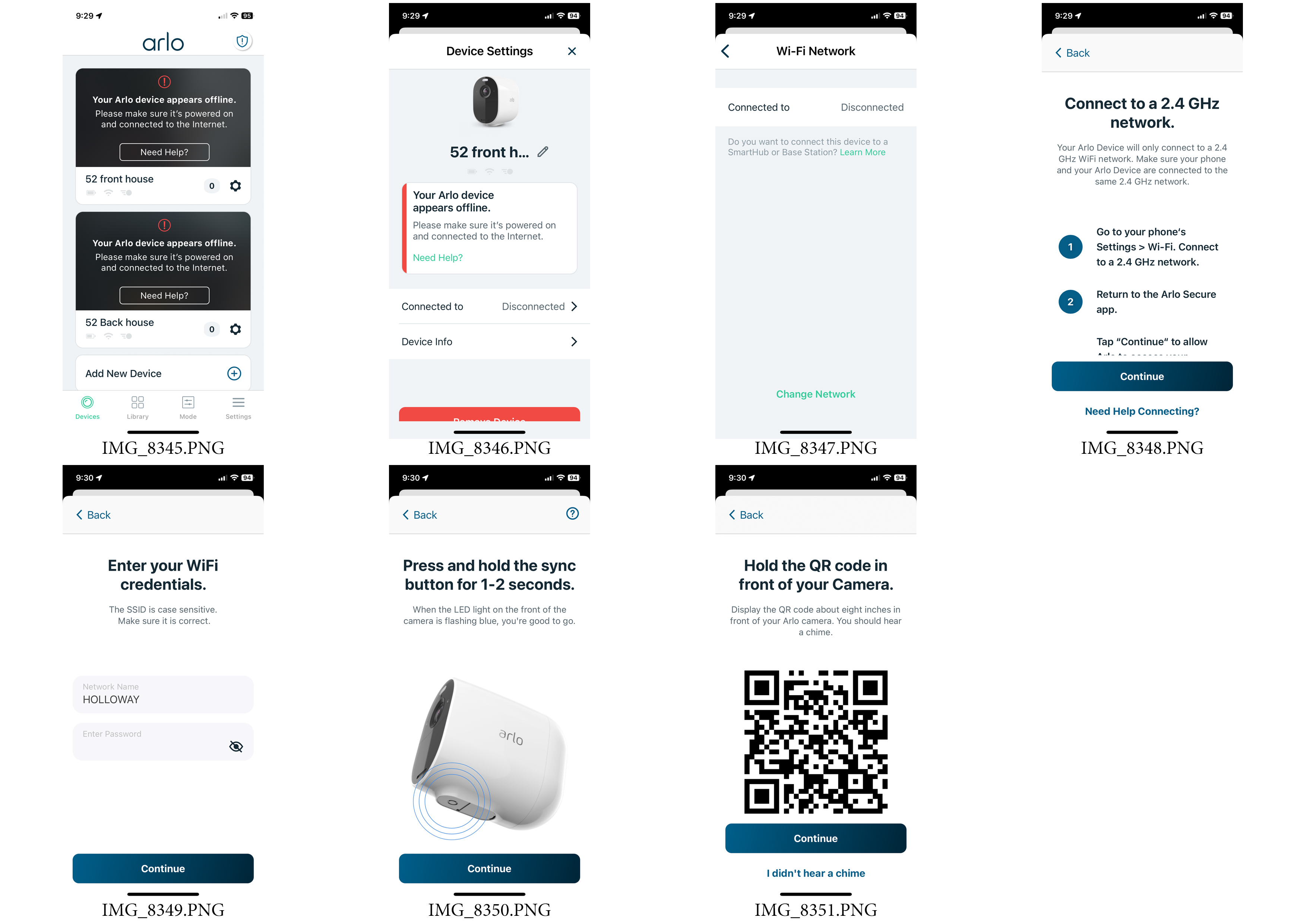
• As the app and the cameras are already installed, I followed the in-app instructions to connect the camera to the new network (Screen shots attached):
1. Open the Arlo app.
2. Tap the cog icon on one of the cameras.
3. The next screen says 'Your Arlo device appears to be off-line. I tap the word 'Disconnected'.
4. I tap the word 'Disconnected' on the next screen as well.
5. The next screen says 'Connect to a 2.4 GHz network' – and here (I think) is the issue. It tells me to connect my phone to a 2.4 GHZ network and then tap continue. My limited understanding is that the Orbi RBR350 is a mesh router and I can't pick and choose between 2.4 GHz and 5 GHz.
6. My iPhone is connected to the WiFi, so I tap 'Continue'.
7. The next screens asks me to input the WiFi network name and password (easy). I tap continue
8. The next screen shows and image of the Arlo camera and asks me to press and hold the Sync button until the LED flashes blue (easy). I tap continue.
9. The next screen generates a QR code. I point the camera at the code and I get a 'chime' sound.
10. Then, with the iPhone, camera and router about 20cm apart, there is a search animation on the phone screen for about 1 min 30 sec, then fail.
I can only assume that it's because my iPhone is on the 5GHz network and, from my research, I see that both the phone and camera must be on a 2.4 GHz network, at least until the setup is complete.
If I login to my Orbi admin account online, I can see check boxes for 'Enable 2.4G' and 'Enable 5G'. Some help articles I've read suggest that I could temporarily un-check the 5G box, go to my phone, forget the network and re-connect, etc, etc, but I don't know if that's a realistic solution. Others suggest changing the channel number or strength. I don't want to tinker too much, as I'm a novice with this level of tech.
Cheers!
- RobholApr 20, 2024Aspirant
I thought it might be useful to attach a screen shot of my Orbi Admin 'Wireless Settings' page, just in case there's a solution via this.
Cheers.
- CrimpOnApr 20, 2024Guru - Experienced User
Can you use an app to decode what is in that QR code? (I have Android and there are at least a dozen apps which will look at a QR code and display the contents.
That information might be really useful in diagnosing what is going on.
- RobholApr 20, 2024Aspirant
Hi there, attached is the decoded QR code from my Arlo app – this is generated part way through the connection process – I point the phone with this QR on the screen, at the Arlo camera and I get a chime sound, which all sounds good. Until the connection process fails.
For the sake of security, I've blacked out the WiFi network name and the password on the attached screen shot.
Cheers.